Support this Pinball Repair Website & PHoF. Please purchase the Marvin3m.com/top

Repairing Williams/Bally WPC Pinball Games from 1990 to 1999, Part One
Copyright 1998-2008 all rights reserved.

Scope.
This document is a repair guide for Williams and Bally WPC pinball games made from 1990 (Funhouse) to 1999 (Cactus Canyon).

Internet Availability of this Document.
Updates of this document are available for no cost at http://marvin3m.com/fix.htm if you have Internet access. This document is part one of three (part two is here, and part three is here).

IMPORTANT: Before Starting!
IF YOU HAVE NO EXPERIENCE IN CIRCUIT BOARD REPAIR, YOU SHOULD NOT TRY TO FIX YOUR OWN PINBALL GAME! Before you start any pinball circuit board repair, review the document at ../begin/index.htm, which goes over the basics of circuit board repair. Since these pinball repair documents have been available, repair facilities are reporting a dramatic increase in the number of ruined ("hacked") circuit boards sent in for repair. Most repair facilities will NOT repair your circuit board after it has been unsuccessfully repaired ("hacked").

If you aren't up to repairing pinball circuit boards yourself or need pinball parts or just want to buy a restored game, I recommend seeing the suggested parts & repair sources web page.

Table of Contents

Bibliography and Credit Where Credit is Due.
Many of the ideas in this repair guide are not original. Lots of people contributed to this document, and I just want to say, "thanks!" Below are a list of the resources used in the development of this guide. Some resources/people may have been innocently left out. If this is the case, and an idea is here that was originally yours, please notify me and I will make sure to give you credit!

  • "WPC theory of operation" (#16-9289), 1991, Williams Electronic Games. This is a great book, and is partially reprinted in part one of this document. Unfortunately it does not include WPC-S and WPC-95.
  • "Pinball Machines: How They Work & Troubleshooting", 2nd edition, 1993, Norbert Snicer, ISBN 0 646 11126 4. Another great resource, but unfortunately it also does not include WPC-S and WPC-95.
  • Jerry Clause, who provided tons of tips and tricks.
  • Mr. Johnson and his web site at http://www.actionpinball.com/tech/index.php. Ray's postings and tips were most helpful.
  • Jonathan Deitch's advice, tips and tricks.
  • Duncan Brown. Duncan provided lots of tips and tricks.
  • Rob Hayes, who's advice and proof reading were very appreciated.
  • David Gersic, who also did proof reading and provided some tips.
  • Bill Ung for his excellent knowledge of this system.
  • Pin Lizard and their very informational web page at pbliz.com.
  • John Sladek for some great tips and tricks.
  • John Robertson and his posts & tips helped mucho grande.
Some people question whether I wrote all this material myself. I did, but of course like everyone, my repair techniques and ideas are gathered not only from my own experience, but from work that others in this hobby do and share at shows, on the internet, etc. So if you're the originator of some cool trick or tip in this document, and I'm not giving due credit, just let me know and I'll add you to the list of contributors above.


1a. Getting Started: Experience, What is WPC, Schematics
    What Repair Experience Is Expected?
    Little experience in fixing pinballs is assumed. Basic electrical knowledge is helpful, but not necessary. I do assume you can solder and use the basic features of a Digital Multi-Meter (DMM) such as measuring voltage and resistance. Please see ../begin for details on the basic electronics skills and tools needed. This document should help if you just bought your first (or second, or third) Williams WPC pinball "as-is", and hope to fix it.

    What is WPC?
    WPC stands for "Williams Pinball Controller". It is the internal pinball computer designed by Williams and used from from late 1990 to 1999. Technically, the WPC chip is functioning as an address decoder. It handles the I/O addressing (done previously with TTL logic and 6821 PIA's on System 11), as well as system clocks, watchdog reset, blanking, and real time clock. There are several generations of WPC (see Different WPC Generations).

    Got Schematics?
    Having a schematic for the game would be ideal, but sometimes it can be fixed without it. If a schematic is not available, order one from one of the suppliers on the parts and repair sources web page.

    WPC Schematic Manuals.
    Some 1991 and prior WPC games (Gilligan's Island and before) have the backbox circuit board schematics inside the game manual. For all other WPC games, the backbox circuit board schematics (CPU, driver, sound and fliptronics) are in a separate manual:

    • Pre-DCS (aka WPC-89, Funhouse to Twilight Zone): part number 16-9473
    • WPC DCS & WPC-S (Indiana Jones to Jackbot): part number 16-9834.2
    • WPC-95 (Congo to Monster Bash): part number 16-10159.2


1b. Getting Started: Necessary Tools
    Fixing electronic pinball games will require a few tools. Luckily, most are not that specialized and are easy to get.

    Non-Specialized Tools Required:

    • Work Light: clamp style lamp
    • Screwdrivers: small and medium size, phillips and flat head
    • Nut Drivers: 1/4", 5/16", and 11/32"
    • Wrenches: 3/8", 9/16", 5/8" required, other sizes suggested
    • Allen Wrenches: get an assortment of American sizes
    • Needle Nose Pliers
    • Hemostat. Handy for holding parts and springs. Best to have both the curved and straight versions if possible.
    • Right Angled Screwdriver: both phillips and flat head.

    Specialized Tools Required:
    These specialized electronics tools are needed. Please see ../begin for details on the basic electronics tools needed.

    • Alligator clips and wire. Buy these at Radio Shack, part number 278-001, $3.69.
    • Soldering Iron.
    • Rosin Core 60/40 Solder.
    • De-soldering tool.
    • Digital Multi-Meter (DMM).
    • Logic Probe.
    • Hand Crimping Tool: Molex WHT-1921 (part# 11-01-0015), Molex part# 63811-1000, Amp 725, or Radio Shack #64-410.
    • Infrared Sensor. Used for determining good infrared optic LED's. Radio Shack sells these for $5.99, part number 276-1099

    Cleaning "Tools" Required:

    • Novus #2 or MillWax (for cleaning playfields and rubber)
    • Novus #3 (for polishing metal parts)
    • A hard paste wax (like Trewax) or hard automotive Carnauba Wax (for waxing playfields and cleaning rubber)
    Novus is available at many places (my local grocery store sells it), or from any good pinball vendor. I don't recommend MillWax, but others like it (mostly because they have been around for a LONG time and are used to it). Do not use any Wildcat products! They react with acyrlic plastics, which the playfield and ramps are coated. Trewax or Meguires Carnauba Wax is available at Kmart or a local hardware store.


1c. Getting Started: Parts to Have On-Hand
    When fixing electronic pinballs, I would highly recommend having some parts on-hand to make things easier and cheaper. All these parts are available from a pinball retailer as listed on the parts and repair sources web page.

    Parts to have:

    • #44 light bulbs: have 20 or so around. Fifty is plenty to do most games. Many people suggest using #47 bulbs instead, as they consume less power and produce less heat, but are also less bright. As a compromise, I personally like #44 bulbs for the computer controlled lights, and #47 bulbs for the general illumination lights. Note "import" 44/47 bulbs are fine and are less expensive (I don't personally see the need to spend more money for the General Electric bulbs).
    • #555 light bulbs: have 20 or so around. Fifty is plenty to do most games.
    • #906 or 912 flash bulbs: have 10 or so around.
    • #89 flash bulbs: have 10 or so around.
    • #86 bulbs: used in Twilight Zone and Creature from the Black Lagoon only.
    • #455 or #545 bulbs: blinking style bulbs. The #545 have a (#555 style) wedge base. Used only in Twilight Zone, Addams Family and No Good Gofers.
    • Fuses: I would have five of any needed value on hand at all times. The voltage rating really does not matter for fuses, as long as they are at least 125 volts. Coils run at 50 volts, only the line voltage fuse in European games could be higher than 125 volts. The fuse voltage only determines *how* the fuse blows (it's the current rating that determines *when* a fuse blows). Do not buy 32 volt fuses.
      WPC-S and Earlier Games:
      For WPC/WPC-S games, these use 1.25" long, 3AG fuses. Radio Shack sells fuses for a decent price. Slow-blo fuses are known as MDL fuses. Fast-blo fuses are known as AGC fuses. At minimum have:
      • 3/8 amp fast-blo (for dot matrix display)
      • 3/4 amp fast-blo (used for 12 volts)
      • 2 1/2 amp slo-blo (used for flippers on non-Fliptronic games)
      • 3 amp slo-blo (used for solenoids, 12 volts, flippers)
      • 5 amp slo-blo (used for general illumination, flash lamps, solenoids, +5 volts)
      • 7 amp slo-blo (for solenoid voltages)
      • 8 amp fast-blo (used for playfield lamps and line filter)
      WPC-95 Games
      Uses the new European standard, smaller GMC, GMD or GDC "T" fuses ("T" means timed, aka slow-blo). All 250 volts (but 125 volt fuses work fine too). WPC-95 uses only "T" (GMC, GMD, GDC) slow-blow 5x20mm fuses. These fuses are smaller, about .75" long. Note these are not GDA, GDB or GMA "F" (F means "fast blow") fuses. Buss uses the "GMC" and Littlefuse uses the "T" terminology ("T" and "GMC" are the same thing). Note these fuses are small and difficult to tell if they are fast or slow blow. So look for the "T" impression on the metal fuse ends to confirm they are slow blow fuses (Radio Shack often mistakenly calls the 5x20mm slow-blow style fuses "GMA" F instead of "GMC" T). Have available:
      • T0.315 amp (audio/video board)
      • T0.63 amp (driver board)
      • T2.5 amp (audio/video board)
      • T4.0 amp (driver board)
      • T5.0 amp (driver board, line fuse)
      • T6.3 amp (driver board)
    • Nylon Coil Sleeves: the longer 2 3/16" length (part number 03-7066-5) are used when rebuilding flippers. The 1.75" length (part number 03-7066) are used for pop bumpers, etc. Sleeves with a lip (part number 03-7067-5) and tubing on each side (known as an "inline" sleeve) are used on the knocker, etc.
    • Flipper Plunger/Link: used when rebuilding flippers (part number A-15847 or A-10656).
    • Flipper Link Spacer Bushings: these small bushings go inside the flipper links (part number 02-4676).
    • Flipper Coil Stops: used when rebuilding flippers (part number A-12390).
    • Flipper EOS Switch: part number 03-7811 (non-Fliptronics) and SW1A-193 (1992 and later Fliptronics games).
    • 1/4" Heat Shrink Tubing: this is used on the flipper pawl when rebuilding flippers.
    • Blue Spring Steel: used for rebuilding the entrance of clear plastic ramps. Available at http://web.archive.org/web/20081205181727/http://www.mcmaster.com/, order the .006" thickness.
    • Shooter Spring: the short chrome spring on the outside of the shooter mechanism (part number 10-149). These rust and look like crap in short order.
    • 1 1/16" Pinballs: a new pinball will make a playfield last longer.
    • Leg Levelers: replace those old crummy looking leg levelers with brand new ones. 3" are used on solid state games.
    • Rubber Rings: order game-specific ring kits with exactly the rings needed (from Pinball Resource). Don't forget to get flipper rubbers and a shooter tip.
    • Transistors:
      • TIP102 (coil drivers)
      • TIP107 (lamp matrix)
      • 2N5401 (coil pre-driver, score display)
      • 2N4403 (fliptronics)
      • 2N5551 (score display)
      • 2N3904 (score display)
      • TIP36c (high power coil driver)
      • MJE15031 (score display)
      • MJE15030 (score display)
      • LM323 (driver board WPC89/WPC-S)
    • Diodes:
      • 1N4004 (flipper coils, switches, lamps)
      • 1N4148 or 1N914 (cpu board)
      • P600D or 6A4 (WPC95 power rectifying)
      • 1N4742 (12 volt, score display)
      • 1N4758 (56 volt, score display)
      • 1N4759 (62 volt, score display)
    • Resistors:
      • 1.8k ohms, 5 watts (score display)
      • 4.7k ohms, 5 watts (score display)
      • 120 ohm, 5 watts (score display)
      • 120 ohm 1/2 watt (score display)
      • 47k ohms 1/2 watt (score display)
      • 39k ohm 2 watt (alpha-numeric score display)
      • 22 ohm 1/2 watt (driver board)
    • Chips:
      • ULN2803 (cpu board switch matrix, driver board lamp matrix)
      • LM339 (opto voltage comparitor for opto board/cpu board)
      • 74LS240 (cpu board)
      • 74LS244 (cpu board)
      • 74LS374 (cpu board, driver board)
    • Bridge Rectifiers: for WPC-S or earlier game, keep a few 35 amp, 200 volt (or higher) bridge rectifiers around, with wire leads. The industry part number is MB3502W (Williams part number 5100-09690, Mouser part number 625-GBPC3502W, Digikey part number MB352WMS-ND).
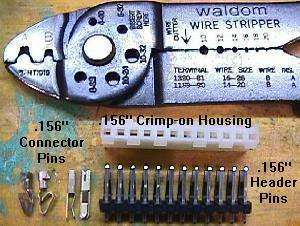
    • Connector pins and housings: used to repair burnt connectors. Buy the plastic connector housing (11 pins or greater), the board header pins, and crimp-on Trifurcon pins (Molex part# 08-52-0113, Digikey part# WM2313-ND), all in .156" size.
    • Optics. LED transmitter optics and "U" shaped optics are good to have on hand. Radio Shack sells the infrared LED (transmitter), part number 276-143C, $1.69 (replaces Williams A-14231). The "U" shaped optos QVE11233.0086 (as used on flipper boards) are available from Competitive Products (remember there are several types of U shaped optos).
    • 15,000 mfd 25 volt "snap caps". These capacitors are used for rectifying +5 and +12 volts. Digikey part# P6577-ND, $5.52 each.
    • 470 mfd 25 volt electrolytic cap for driver board C4.
    • Triacs: used for the general illumination circuit (not needed very often). The specs for a WPC triac to use are pretty lose. For example all these work: BT138-600E, BTA12-600, NTE5671 (800v 16amp), NTE56010 (800v 15amp), or NTE56008 (600v 15amp).

    All parts can be ordered from one of the suppliers on the parts and repair sources web page.


1d. Getting Started: Different WPC Generations
    There are essentially six different generations of WPC systems. Components and circuit boards change with each generation. Therefore it is essential to know the game generation before starting repair.

    • WPC Alpha-Numeric: used from Funhouse (10/90) to The Machine BOP (4/91). This generation of WPC used 16 digit alpha-numeric displays. These also used "normal" flippers, without a Fliptronics board. Identified by no Fliptronics board in the upper left corner of the backbox, and no dot matrix control board in the upper right side of the backbox (some Dr.Dude games were also this WPC generation although most were System11). All Dr.Dude WPC and early Funhouse games used System11 sound boards.
    • WPC Dot Matrix: used from Terminator2 (6/91) to Party Zone (10/91). This generation of WPC used "normal" flippers, without a Fliptronics board. Identified by no Fliptronics board in the upper left corner of the backbox. Most Party Zone games don't have Fliptronics boards, and fall into this category.
    • WPC Fliptronics: Used from Addams Family (2/92) to Twilight Zone (5/93). Some late Party Zone games also used this generation of WPC. The Fliptronics (I) board used in Addams Family and Party Zone are slightly different than all later Fliptronics II boards. The difference being the addition of a bridge rectifier to the Fliptronics II board for the flipper voltage.
    • WPC DCS: Starting with Indiana Jones (10/93), Williams upgraded the sound card to use "digitally compressed sound" (DCS) as a different sound compression system. This gave much better sound and more sound storage space.
    • "WPC-89": All the WPC generations listed above are generically grouped together and known as WPC-89 (initial design year of 1989, opposed to WPC-95 which had an initial design year of 1995).

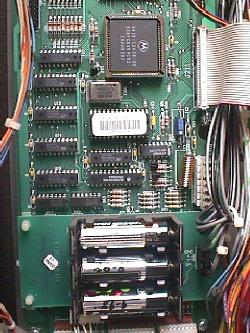
    A WPC-Security CPU board. The chip with
    the white bar code label is the security PIC.
    This chip is game specific. Replacements are
    now available from http://web.archive.org/web/20081205181727/http://www.shiftedbit.com/.
    Note the different battery placement
    configuration on WPC-S CPU boards.

    WPC-S CPU board

    • WPC-Security (WPC-S): Starting with World Cup Soccer (3/94), a security PIC chip was added to the CPU board in all WPC-S games at location U22. This PIC (Programable Integrated Circuit) chip was game specific. CPU boards can not be swapped between different models of game without changing the security PIC chip (i.e. Corvette CPU board put into a Shadow game must have the Corvette PIC changed to a Shadow PIC chip). Each security PIC chip had a special serial number encoded into the chip. This number displays on the dot matrix screen for a few seconds as the game is turned on.

      The number displayed shows what distributor the game was shipped to from the factory. This was done by Williams because of problems in Europe with distributors selling games outside of their sales territory. Anyone could turn a game on, write down the displayed serial number, and determine if the game was "bootlegged" from another distributor. However, this was defeated by adding a dot matrix power delay board. This small board didn't power the dot matrix display until the game was turned on for about 10 seconds. This meant the game was in attract mode (and the PIC number no longer displayed), before the dot matrix display was even turned on. This was embarrassing to Williams, as they spent much time and money to develop the security PIC chip system as a distributor territory protection device, yet the system was disabled by a simple modification. As a backup, there is probably a set of "secret" flipper button codes that will display the PIC number when the game is in attract mode (hence getting around the DMD power delay).

      Unfortunately for us, the PIC chip makes CPU repair more difficult, as CPU boards can't be swapped between games without changing the PIC chip. To make things worse, new PIC chips were available from Williams for about $180 (retail) each. They were priced at this amount to deter distributors who are bootlegging from purchasing additional PIC chips. Now that Williams is out of the pinball business (as of Oct 25, 1999), there are two companies making replacement PIC chips. In both cases these new chips are a complete re-write of the original PIC code, so there are no copyright or legal issues. They work with any version of the game's CPU ROM code too. These new PIC chips are still game specific, but for the price, they are a bargain. Available from Dave Astill (no web page) and www.shiftedbit.com (called "Ewe-22").

      Williams manufactured and distributed a few redemption games during the "FunHouse Games" label era (around 1992), including Screamin' Slopes, Wheel of Fortune, and Real Monsters. They were designed and programmed out-of-house, and have no WPC circuitry inside. The only redemption pieces that used WPC hardware are Ticket-Tac-Toe and Addams Family Values (Curiously, neither of those were marketed under the "FunHouse Games" label).

    • WPC-95: Starting with Congo (3/96) (and some Jackbot games), Williams introduced a new WPC-95 CPU, driver board, and audio/visual system. The Fliptronics board is now incorporated into the driver board. The sound and dot matrix controller board are combined into one board. WPC-95 also used a security PIC chip which is at location G10. Most of the WPC-95 circuits are the same as WPC-S and earlier. Exceptions include putting all the dot matrix display and DCS sound driver logic into a single logic array chip (similar to the WPC chip on the CPU board).


1e. Getting Started: Game List
    Here are the list of WPC games and which generation they are. The date indicated is the initial release date of the game (determined from William's ROM code release dates, where available). Note that pre WPC-S games are also known as "WPC-89" games (so the three main WPC generations are WPC-89, WPC-S, and WPC-95).

    WPC Alpha-Numeric
    WPC-89 CPU board.
    A-12738 sound board
    • Dr.Dude, 10/90 *
    • Funhouse, 10/90 *
    • Harley Davidson, 3/91
    • The Machine BOP, 4/91

    WPC Dot Matrix
    WPC-89 CPU board.
    A-12738 sound board

    • Slugfest Baseball, 6/91
    • Gilligan's Island, 7/91
    • Terminator2, 7/91
    • Hurricane, 2/92
    • Party Zone, 10/91 *
    • Hot Shots (Basketball game)

    WPC Fliptronics
    WPC-89 CPU board.
    A-12738 sound board
    A-15472 Fliptronics II board

    • Party Zone, 10/91 *
    • Addams Family, 3/92 **
    • The Getaway, 4/92
    • Black Rose, 8/92
    • Fish Tales, 10/92
    • Dr.Who, 10/92
    • WhiteWater, 12/92
    • Creature Black Lagoon, 1/93
    • Dracula, 2/93
    • Twilight Zone, 4/93 #
    • Addams Family Gold, 7/94

    WPC DCS
    WPC-89 CPU board.
    A-16917 DCS sound board.
    A-15472 Fliptronics II board

    • Indiana Jones, 7/93 #
    • Judge Dredd, 8/93 #
    • Star Trek Next Generation, 11/93 #
    • Popeye, 1/94 #
    • Demolition Man, 4/94 #
    • Addams Family Values (redemption).***

    WPC-Security
    WPC-S CPU board.
    A-16917 DCS sound board.
    A-15472 Fliptronics II board
    • World Cup Soccer, 7/94
    • Flintstones, 7/94
    • Corvette, 9/94
    • RoadShow, 10/94 #
    • The Shadow, 12/94
    • Dirty Harry, 1/95
    • Theatre of Magic, 3/95
    • No Fear, 4/95
    • Indianapolis 500, 8/95
    • Johnny Mnemonic, 9/95
    • Jackbot, 8/95*
    • Who Dunnit, 11/95

    WPC-95
    WPC-95 CPU board.
    A-20516 audio visual board.

    • Congo, 12/95
    • Attack from Mars, 2/96
    • Safe Cracker, 4/96
    • Ticket Tac Toe (redemption), 3/96
    • Tales of Arabian Nights, 5/96
    • Scared Stiff, 9/96
    • Junkyard, 1/97
    • NBA Fast Break, 3/97
    • Medieval Madness, 7/97
    • Cirqus Voltaire, 11/97
    • No Good Gofers, 12/97
    • Champion Pub, 3/98
    • Monster Bash, 8/98
    • Cactus Canyon, 2/99

    * These games share two different systems. Only about 100 Dr.Dudes are WPC (most are System11). Early production Funhouse and all WPC Dr.Dude games use System11 sound boards. Most Party Zone games are not WPC Fliptronics (also a few Jackbot games were WPC-95. The sound ROMs are different between WPC-S and WPC95 Jackbot, but the PIC and CPU ROMs are the same).
    ** Addams Family only used a special Fliptronics I board (but a Fliptronics II board can be used in these games). *** Addams Family Values uses an A-12742 CPU and an A-16917 (DCS) sound board, but the second sound amp (U27) and associated components (about a dozen) are not populated on the sound board. Also AFV uses a compact form factor version of the WPC power driver board A-17453, with a 8x8 lamp matrix, and provision for eight solenoid drives. Each solenoid drive has a pre-driver and driver (TIP-102), and can also have a high-power driver (TIP-36C) stuffed at each position. AFV is configured with 7 general purpose and 1 high power solenoid drives. The board does have connections for GI input and output, but there are no TRIACs for dimming GI. The input and output connections simply loop through their associated fuses.

    Other Interesting Historical Tidbits.
    The first dot matrix Williams/Bally game released for sale was actually Slugfest in the summer of 1991. Terminator2 was the first game designed with a dot matrix display, but Slugfest and Gilligan's Island (which both had shorter development cycles) beat T2 to market.

    All games Gilligan's Island and later use "diamondplate" for the playfield coating (though not all later games say "diamondplate" right on the playfield). Diamondplate is a automotive style urethane coating, which replaced Lacquer. Bride of Pinbot and early games used Lacquer playfields, except for a few in each game title (mostly Pat Lawlor games, since Pat was the one pushing Diamondplate) that were made with Diamondplate. These early pre-Gilligan Island diamondplate playfields are always labeled with a "Diamondplate" logo usually on the lower right side of the playfield near the game credits. Banzai Run (system11) was the first game (by Pat Lawlor) where diamondplate was tried.

    Most WPC games use a "translight" (a plastic film) for the backglass artwork. Therer are a few exceptions. No Good Gofers and Champion Pub used a "real" backglass with artwork screened directly onto the tempered glass. Cirqus Voltaire uses a screened acrylic backglass that covers the full area of the backbox. It has speaker grill slots cut into the plastic at the lower left and right corners.

    Playfield Glass Size.
    All pinball playfield glass is "tempered" glass. Do NOT use "plate" glass in a pinball game!

    • All the above games (except where noted below) use the standard glass size of 21" x 43" x 3/16". This size was used on most pinball games from the 1950's through WPC.
    • # - These games are "super-pins" with wide playfield bodies. These use 23.75" x 43" x 3/16" tempered playfield glass.
    • Safe Cracker and Ticket Tac Toe used 18.5" x 36.5" x 3/16" tempered playfield glass.
    • Slug Fest, a WPC pitch and bat game, uses 23" x 35 1/4" x 3/16" tempered playfield glass.

    The size of the glass covering the translight on nearly all WPC games is 18 7/8" x 27" (Safe Cracker uses 18 7/8" x 19 1/2). The glass thickness is what most hardware stores call "double thick" glass, which is about 1/8" thick. Tempered glass can be used for the translight, but really it is not needed there (unlike playfield glass which must be tempered!) Note backglass assemblies changed with WPC-95, when Williams changed to the "light tub" to hold the backbox lighting. The translight channels are wider than previously used. WPC-95 translight lift channel part numbers are WLL-03-9420 for the bottom lift channel, WLL-03-9421-1 for the top channel, and WLL-03-9421-2 for the (2) side channels.

    Leg Color.
    Most WPC Bally/Williams games use chrome legs, but there are some exceptions. Corvette, Dr.Who, Harley Davidson, Black Rose, Star Trek Next Generation and Party Zone (and also all Pinball 2000 games) used black legs. Creature from the Black Lagoon uses very dark (gun metal) grey legs (almost black, but not quite). Corvette used black legs and black metal side rails and lockdown bar, and was the only Bally/Williams WPC game to have that. Roadshow used blue legs (and early "sample" games used a blue lockdown bar too). A few games used gold anodized legs, including Indiana Jones, Flintstones, Addams Family Gold, World Cup Soccer and Judge Dredd. All other games not mentioned above used chrome legs.


1f. Getting Started: Lubrication Notes
    Pinball machines, for the most part, do not require any lubrication. Most parts run "dry". Far more damage can be done to a pinball machine by over-lubricating, than by under-lubricating. As a rule, if in doubt as to lubrication, don't do it! Throw that WD-40 away, it won't be used here.

    The only parts that will require any lubrication are metal-to-metal moving parts. There aren't very many in a game. Only ball eject and slingshot hinges. Use 3-in-1 oil on these if you must. But try and keep that lubrication in the tool box and away from the game.

    If some prior person did lubricate the game, the lubrication has probably now congealed with the infamous "black pinball dust" to form a thick, black mess. This is unrepairable on coil sleeves, and new parts will need to be installed.


1g. Getting Started: The Circuit Boards (Generations)

    There are basically three main WPC generations: WPC-89, WPC-S, and WPC-95, with WPC-89 have several sub-generations. Some boards are interchangable between games and systems, some are not.

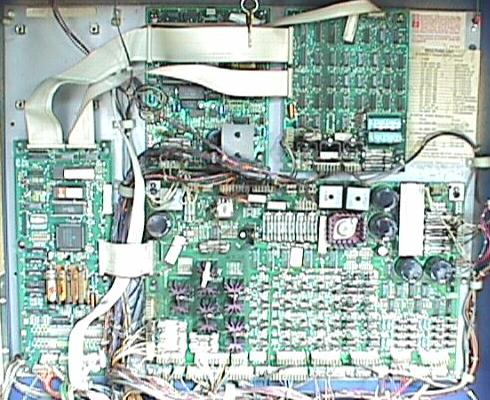
The back box in a 1991 Bally Gilligan's Island (second generation WPC-89).
The CPU board is on the far left. The driver board is the largest board,
and occupies the lower right area. The sound board is at the upper middle.
The dot matrix controller board is at the upper right. The "missing"
board (upper left) is where the Fliptronics board will be located on 1992
and later games. Note the four mounting posts for this missing Fliptronics
board. Newer Fliptronics II boards use six mounting posts.

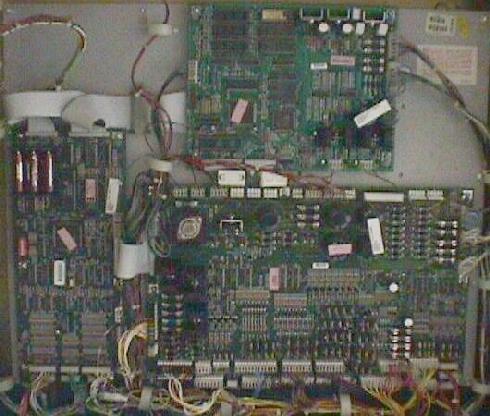
WPC (1991) boards

WPC-95 boards. Note fewer number of boards in WPC-95. The Fliptronics
board is now incorporated into the Driver board. The dot matrix controller
board and the sound board are combined into one board called the "A/V board".
WPC-95 boards

    WPC Power Driver Board.
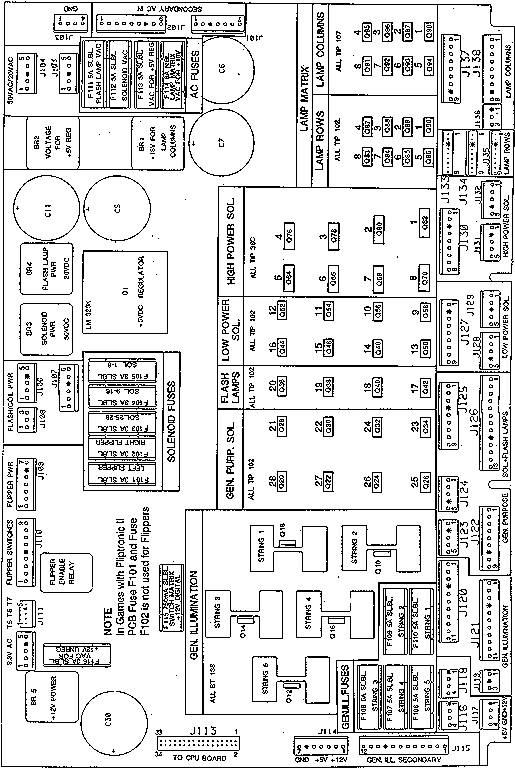
    Most of the repair work will probably relate to this board. The more familiar one is with the Driver board, the better they will be able to fix WPC games. The driver board drives all solenoids and lamps. It provides the power for almost all the parts of a WPC pinball game. It houses most of the fuses too.

A drawing showing the usage of the connectors, fuses and transistors on a
WPC-S and prior Driver board.

WPC power driver board

    Board Generations.
    Note the following "A" numbers for each WPC board are NOT printed on the boards themselves. The "A" numbers are from the game manuals, and are known as the "assembly" numbers. Often the "A" number is on a sticker stuck on the component side of the board. The second number (in parends) starting with "5" is the bare board part number (no part installed). This number IS printed on the solder side of the board itself. It is possible to swap some boards between WPC games.

      CPU board.

      • A-12742-gamenumber (5764-12431-00): non-security WPC-89 version used from Funhouse to Popeye. Swappable between these games only providing the correct game EPROM is used (early versions of this board need a jumper change to convert from a 512k 27512 or 1meg 27010, to a 2meg 27020 or 4meg 27040 game EPROM). This is also known as a WPC-89.
      • A-17651-gamenumber: WPC-S (security) version used from World Cup Soccer to WhoDunnit. Swappable between these games only, providing the correct PIC security chip and game EPROM is used.
      • A-20119-gamenumber: WPC-95 CPU board. Can be used on any WPC-95 game from Congo to Cactus Canyon, providing the correct PIC security chip and game EPROM is used. A-21377-gamenumber (5764-14823-0). Can also be 04-12358 (same as A-21377 but without the game specific chips). There is also a A-21369 version that uses a different RAM chip. These are all interchangable among WPC95 games. Can be used on any WPC-95 game from Congo to Cactus Canyon, providing the correct PIC security chip and game EPROM is used.

      CPU boards are not interchangable between different WPC generations (that is, a WPC-95 CPU board can not be used in a WPC-89 game).

      CPU Board EPROM Size Jumpers (W1/W2).
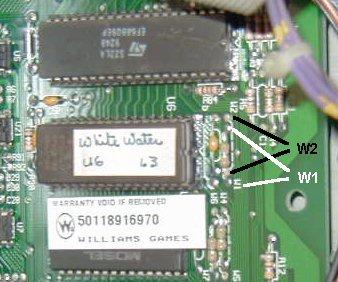
      On pre WPC-S CPU board A-12742, there are two jumpers that relate to the size of the U6 EPROM. In most cases, these jumpers will not need to be changed. Only on very early WPC games using smaller 1meg EPROMs (Funhouse, Harley Davidson, Bride of Pinbot) this can be a problem. For example, if a Funhouse game is running the original first version of software (using a 1meg 27010 EPROM), and then is upgraded to the latest vesion (using a 2meg 27020 EPROM), the jumpers will need to be changed. Or if an original Funhouse CPU board is used in a later game using a 4meg 27040 EPROM, the jumpers will also need to be changed.

      Both of these jumpers are located to the right of the U6 game ROM chip, when looking at the board as mounted in the backbox (see below). A jumper is basically a wire that connects two points on the board. The CPU board jumper labels are located in between two points, with dotted lines outlining the two points to jumper. The jumper may be just a simple bare wire, or a wire with white ceramic insulator around the middle of it, or may look like a (zero ohm) resistor. A connection between either set of two points is considered "In". A set of two points that doesn't have a connection between them is considered "Out". A soldering iron is required to change these jumpers. Here is the jumper chart:

        Pre WPC-S CPU Board EPROM Jumpers
        EPROM Size Jumper W1 Jumper W2
        1meg (27010)
        OUT
        IN
        2meg (27020)
        IN
        OUT
        4meb (27040)
        IN
        OUT

    On pre WPS-S CPU boards, shown are the W1 and W2
    EPROM size jumpers to the right of the U6 chip. This
    game is set for a 27020 or 27040 EPROM.

      On some schematics, the W1/W2 jumpers are shown to indicate the type of display used (alpha-numeric, or dot matrix). A dot matrix display is shown as W1=in, W2=out. An alpha-numeric display is shown as W1=out, W2=in.

      CPU Board Country Jumpers (W15-W18).
      On pre WPC-S CPU board A-12742, there are four jumpers that relate to the country of usage for the game. These jumpers will determine the default language, game rules and coinage for the game, and are located to the left of the large square U9 chip. If a WPC game is imported back to the USA, I would highly suggest converting the jumpers to America2 or America language settings. This way if the batteries die, the game will boot up in English instead of say German.

      As described above for the EPROM size jumpers, the jumper may be just a simple bare wire, or a wire with white ceramic insulator around the middle of it, or may look like a (zero ohm) resistor. It could also be a DIP switch too (Williams started using DIP switches for these jumpers somewhere around Star Trek Next Generation). A connection between either set of two points is considered "In". A set of two points that doesn't have a connection between them is considered "Out". A soldering iron is required to change these jumpers if there is no DIP switch.

      The inside front page of the game's operating manual should identify exactly how jumpers W15-W18 should be set. Note W13 and W14 should always be IN (set) regardless of the country setting. If the W15-W18 jumpers are set to an unknown setting, the game can exhibit an error on the score display which say (for example), "country code must be specified using jumpers W15-W18. Cut W15,W16,W17,W18 for USA". This is most often seen on Twilight Zone (which seems to prefer the America2 setting with W15-W18 removed). Again confirm the exact setting in the game manual. Shown below is a typical chart for this (though it can vary from game to game).

      On imported/exported WPC games from other countries I generally remove W15-W18 for "America2" as this is an English language default. It is a lot easier to cut jumpers than it is to add them back! There is always potential for board damage when soldering jumpers, so removing W15-W18 is definately the easiest way to make a game default to North American English standards.

      Typical Pre WPC-S CPU Board Country Jumpers
      Country Jumper
      W13
      Jumper
      W14
      Jumper
      W15
      Jumper
      W16
      Jumper
      W17
      Jumper
      W18
      America2*
      In
      In
      Out
      Out
      Out
      Out
      America
      In
      In
      In
      In
      In
      In
      Spain
      In
      In
      Out
      In
      In
      In
      Europe
      In
      In
      In
      Out
      In
      In
      French
      In
      In
      In
      In
      Out
      Out
      German
      In
      In
      In
      In
      In
      Out
      * Some games use the "America2" settings instead of the "America" settings. But either America or America2 is a good setting for WPC games in North America.

    On pre WPS-S CPU boards, shown are the W18 to W13 (left to
    right) country jumpers to the left of the large square U9 chip.
    W13-W18 are "in", so this games is set for "America".

      For WPC-S and WPC-95, Williams changed to a eight position DIP switch block for country of usage. This requires no tools to change the jumper seetings. Here are the typical settings (again confirm the settings with the owners manual):

        WPC-S/WPC-95 CPU Board Country Jumpers
        Country SW1 SW2 SW3 SW4 SW5 SW6 SW7 SW8
        America
        Off
        Off
        On
        On
        On
        On
        On
        On
        Europe
        Off
        Off
        On
        On
        On
        Off
        On
        On
        French
        Off
        Off
        On
        On
        On
        On
        Off
        Off
        German
        Off
        Off
        On
        On
        Off
        On
        On
        On

      Transformers.
      All pre WPC-S games have the transformer near the front coin box area of the lower cabinet. With WPC-S, the transformer moved to a mounting plate on the back of the lower cabinet. The second generation WPC-95 transformers are a bit smaller than earlier WCP-95 models having wider mounting brackets (hence "wide mount"). Across all the WPC machines, the output connections are the same, which is dangerous since all WPC transformers are not interchangable. DCS WPC games definately need a different transformer than non-DCS games, as the sound board requires different unregulated voltage.

      • 5610-12835-00: Installed in alpha-numeric WPC and pre-DCS dot matrix games including Black Rose, Dracula, Bride of Pinbot, Creature, Dr.Who, Funhouse, Fishtales, Gilligan, Harley Davison, High Speed2, HotShots Basketball, Hurricane, Party Zone, Slugfest, Terminator2, Addams Family, Twilight Zone, Whitewater.
      • 5610-13491-00: Used in WPC-89 games with DCS sound and the transformer mounted by the coin box including Indy Jones, Demo Man, Judge Dredd, Pinball Circus, Popeye, Star Trek Next Gen.
      • 5610-13953-00: Used in WPC-S games with DCS sound with the transformer mounted at the lower cabinet's back including Corvette, Dirty Harry, Flintstones, Roadshow, Shadow, World Cup Soccer.
      • 5610-14515-00: WPC-95 transformer (not wide mount)
      • 5610-14515-01: Second WCP-95 transformer with wide mount
      • 5610-15930: Pinball 2000 transformer

    Driver board.

    • A-12697-1 (5763-12405-00): the driver board used from Funhouse to the middle production of Twilight Zone. It has a flipper enable relay on the board. Can be used on all WPC games from Funhouse to WhoDunnit (the most versatile non-WPC95 driver board, can be used in any WPC-89 or WPC-S game). On Fliptronic games (Addams Family and later), the flipper relay is ignored by the game's software.
    • A-12697-3: Used starting mid-production of Twilight Zone. The flipper enable relay is not installed (since these games have Fliptronics boards, and no long need the relay). Can be used on Addams Family to WhoDunnit. Can *not* be used on Funhouse to Hurricane because of the lack of the flipper relay, which is needed in non-fliptronic games (games prior to Addams Family).
    • A-12697-4: One of the solenoid fuses changef rom 3amp to 5 amp, removed the "line level circuitry" (around U6). WPC Schematic Manual 16-9834.2 details these changes on page 1 of the power driver board schematics. The specific components are R1, R2, R3, R4, R5, R6, R195, R200, F201, W1, W2, LED2, and LED3. Can be used on Addams Family to WhoDunnit (interchangable with the -3 revision). Only used on a one game (just WhoDunnit so it seems). Thanks Tony.
    • A-20028 (5763-14525-06): WPC-95 only driver board. Can be used on Congo to Cactus Canyon only.
    The first generation driver board A-12697-1 is the most versatile, and can be used on all non-WPC95 games.

    Sound board.

    • A-12738-gamenumber: analog/digital hybrid. Can be used on Funhouse to Twilight Zone, providing the correct sound EPROMs are used.
    • A-16917-gamenumber: DCS sound board with pure DSP generated digital sound. Can be used on Indiana Jones to WhoDunnit, providing the correct sound EPROMs are used.
    • A-20516-gamenumber (5760-14495-10): WPC-95 only sound/audio visual board. Can be used on Congo to Cactus Canyon only, providing the correct sound EPROMs are used.
    Sound boards are not interchangable between different WPC generations. Also each game uses its own Sound ROMs, which would need to be changed if a board is swapped from game to game (or your Addams Family could be playing Funhouse sounds!) Within a generation, there can be some minor differences between sounds boards too. For example, the sound board on Funhouse has some different resistor values than the sound board on Addams Family to vary the sound level for voice and background sound (though they are the same sound board, and are interchangable). More information on this can be found here.

    Display board.

    • A-12739-1: Alphanumeric WPC Display Driver board, from Funhouse to the Machine BOP.
    • A-14039 (5760-12710-00 REV 6): Dot matrix, from Terminator2 to World Cup Soccer (at least this is what the game manuals indicate). Infact, this board was really used from Terminator2 to Popeye (all pre WPC-S dot matrix games).
    • A-14039.1 (5760-12710-12): Dot matrix, from Flintstones to WhoDunnit (at least this is what the game manuals indicate). Again infact, this board was actually used from World Cup Soccer to WhoDunnit (all the WPC-S games).
    • WPC-95 did not use a separate display board, hence games Congo to Cactus Canyon do not need this board (display is handled by the WPC-95 A-20516-(game number) "audio-visual" board).
    Note "5760-12710-00 REV 6" and "5760-12710-12" are completely interchangable and plug compatible. The only difference in the newer -12 board is the additon of a 74HCT138 chip at location U12 (between U11 and U34). The older -00 board has a spot for this chip on the board, but the chip is not installed (and no, the chip can not be added to upgrade a -00 board to a -12; other changes must also be made). Apparently there was a problem caused by new (internally smaller die size) parts such as RAM and support glue logic. This brought up a race condition that had been overlooked in the original "REV 6" design. If repairing an older "REV 6" board with newer parts, it could show some problems (wandering and/or flickering dots on the display).

    WPC-95 A/V Board.

    • 04-12357-2: This is apparently an A-20516 without game-specific chips. There is also an A/V board with part number A-20145-2. These are all interchangable.

    Fliptronics board.

    • A-15028: Flipper Controller Assembly (Fliptronics I), used on Addams Family only. Can not be used on any other game.
    • A-15472: Fliptornics II board, used from Getaway to Twilight Zone. Fliptronics II adds a bridge rectifier to the circuit (interchangable with A-15072-1).
    • A-15472-1: Fliptornics II board, used from Indiana Jones to WhoDunnit. The only difference between this and A-15472 is the 50 volt filter capacitor for the flipper power was removed (interchangable with A-15072).
    • WPC-95 did not use a separate Fliptronics board, hence games Congo to Cactus Canyon do not need this board.

    Flipper Opto board.
    Starting half way through the production of Addams Family, Williams started using a flipper opto board instead of leaf switches for the flipper cabinet switches. Each flipper opto board (there are two, one for each flipper cabinet switch) holds two, 4-leg "U" shaped optics. The board has one optic for the lower flipper, and one for the upper flipper (even if the game only has two lower flippers). Starting with WPC-95, the "U" optic changed to a five leg opto (known as a Schmitt trigger opto). These newer five leg optos has less problems with dust and intermittent operation. Either opto flipper board can be used and interchanged amoung any game using flipper cabinet opto switch boards.

    • A-17316 (5768-13469-00): WPC-S and prior 4-leg "U" opto flipper cabinet switch board.
    • A-20207.1 (5768-145-8-00): WPC-95 5-leg "U" opto flipper cabinet switch board.


1h. Getting Started: Introduction to Operation
    Much technical information in this section. If this makes you uncomfortable, please skip. This info is provided for completeness. You don't need to understand it to repair a WPC game. All the connector/chip numbers listed below are for WPC-S and prior games (though this information generally applies to WPC-95 too).

    Connector, Fuse and Board Numbers.
    Every plug has a number that identifies the circuit board and position on the board that it connects to. For example, J101 designates board 1, jack 1. Identifying the pin number of a connector involves a hypen. For example, J103-5 means board 1, jack 3, pin 5.

    Fuses are also identified in this manner. For example, F501 means board 5, fuse 1.

    Prefix number for WPC boards:

    • 1 = Power driver board
    • 2 = CPU board
    • 3 = Display driver board
    • 4 = Dual or single display board
    • 5 = Sound board
    • 6 = Dot matrix controller board
    • 7 = Printer kit boards
    • 9 = Fliptronics board

    Circuit Board Descriptions.

    • CPU board: The CPU board uses a 68B09E microprocessor and controls all logic and switch functions.
    • Power Driver Board: Does not contain any game specific components. Contains the lamp, general illumination (GI), flipper (pre-fliptronics) and solenoid circuits. Also supplies +18 volts for the lamp circuits, +50 volts for the solenoids, +5 volts for the logic circuits, +12 volts for the switch circuits, and 6.3 volts for the general illumination circuits. Not game specific.
    • Display Driver Board: part number A-12739. Used on pre-dot matrix WPC games. The hyphen after the part number indicates how many extended displays are used. No extended display is "-1", one extended display is "-2", and two extended displays is "-3".
    • Single Display Board: part number A-12794. Used on pre-dot matrix WPC games, and contains one 16 digit alpha numeric display glass.
    • Dual Display Board: part number A-12793. Used on pre-dot matrix WPC games, and contains two 16 digit alpha numeric display glass.
    • Dot Matrix Controller Board: supplies the data for the dot matrix display to operate. Not game specific.
    • Dot Matrix Display/Driver Board: contains the dot matrix glass and driver board. Not game specific.
    • Sound Board: produces all speech and music.

    CPU Board Operation.
    CPU board performs two main operations: logic and switch control.

    • Microprocessor (U4): uses a 68B09E to control and process data. The "B" and the "E" designations are required for WPC games (that is, a 68B09 or 6809E will not work in WPC games). With an oscilloscope, the address and data lines should be square waves with at least 4 volts peak to peak. The processor runs at 2 mHz clock supplied by pins 81, 82 of the ASIC. Pins 34, 35 of the processor should be square waves, at least 5 volts peak to peak. Reset (pin 37), IRQ (pin 3), and R/W (pin 32) should also be at least 4 volts peak to peak during normal operation.
    • ROM (U6): uses a 1 meg to 8 meg EPROM which contains the game program. Using an oscilloscope, the address and data lines should be 4 volts peak to peak square waves.
    • RAM (U8): uses a 2064 CMOS RAM which store game specific audit information and adjustment settings. The battery circuit is connected to the cathodes of D1 and D2, which connect to U8 pins 26 and 28. When the game is on, pins 26/28 should have +5 volts peak. When the game is off, pins 26/28 should have at least +4 volts as supplied by the battery. If this drops below +4 volts, memory reset will occur.
    • ASIC (U9): stands for Application Specific Integrated Circuit. This chip handles the address decoding, system timing, a real time clock, and system sequencing. Using an oscilloscope, the address and data lines should be at least 4 volts peak to peak. The other pins on this chip should have either a solid high or solid low with nothing floating. This chip is not game specific, but is specific to WPC. Provides two clocks (real time and system timing). The blanking circuit is monitored by the ASIC. Blanking is active during power on until the microprocessor is running, and has reset the latches to the normal operating modes. This prevents coils or motors from energizing when the game is turned on. Once the microprocessor has reset the latches blanking becomes +5 volts level.
    • Miscellaneous Buffers/Latches (U1, U2, U3, U5, U7, U12, U21): used as temporary memory storage for the microprocessor. Address and data lines should be 4 volts peak to peak. Any address or data lines that are not pulsing should have a solid high or low, nothing floating.

Switch Matrix (all WPC games)
Dedicated
Grounded
Switches
Column/
Row
1
Green-
Brown
2
Green-
Red
3
Green-
Orange
4
Green-
Yellow
5
Green-
Black
6
Green-
Blue
7
Green-
Violet
8
Green-
Gray
D1 Orange-Brown
    Left Coin Chute
1 White-
   Brown
11 Right
   Flipper
21 Slam
   Tilt
31
41
51
61
71
81
D2 Orange-Red
    Center Coin Chute
2 White-
   Red
12 Left
   Flipper
22 Front
   Door
32
42
52
62
72
82
D3 Orange-Black
    Right Coin Chute
3 White-
   Orange
13 Start
   Button
23 Ticket
Dispenser
33
43
53
63
73
83
D4 Orange-Yellow
    4th Coin Chute
4 White-
   Yellow
14 Tilt
   Plumb
24 Test
   Position
34
44
54
64
74
84
D5 Orange-Green
    Service Credits
5 White-
   Green
15
25
35
45
55
65
75
85
D6 Orange-Blue
    Volume Down
6 White-
   Blue
16
26
36
46
56
66
76
86
D7 Orange-Violet
    Volume Up
7 White-
   Violet
17
27
37
47
57
67
77
87
D8 Orange-Gray
    Begin Test
8 White-
   Gray
18
28
38
48
58
68
78
88

    • Switch Circuit: operates on +12 vdc. Most switches are tied to a column and row circuit. Some switches are "dedicated" and their curcuit is tied directly to ground through a switch. Playfield and cabinet switches make up the matrix, while the coin door makes up the dedicated switches.

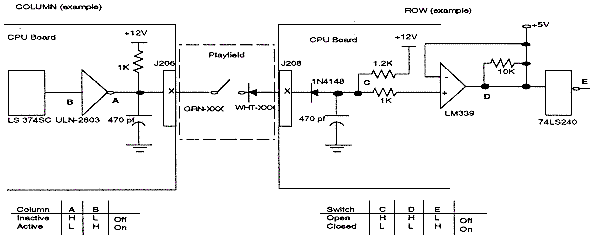
Switch Matrix circuit.

    • Switch Matrix Circuit: microprocessor constantly strobes the column side of the switch matrix. When the ULN2803 (column) toggles low from a switch closure, the column is active.

      When a switch closes, point C on the row circuit drops low, This causes the "+" input to the LM339 to go below +5 volts so point D is low, and the row is active. When corresponding row and column switch are low at the same time, the switch circuit is active and is registered as closed by the microprocessor. When the switch opens, point C on the row circuit is high, and the "+" input to the LM339 is at +5 volts. This makes point D high, and row is inactive.

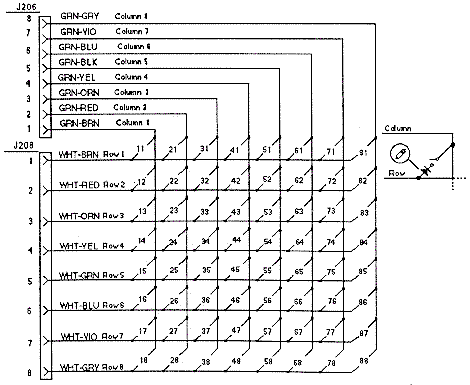
Switch Matrix rows and columns.

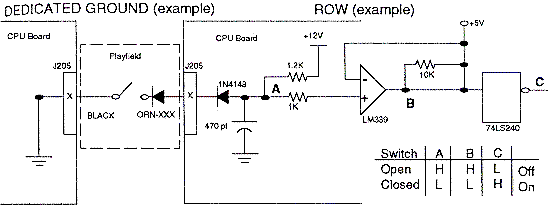
    • Dedicated Switch Circuit: these switches have a similar circuit as the matrix row switches. The dedicated switches include the coin door test buttons and coin switches. These are separate from the switch matrix because if a playfield switch problem occurs and blows the entire switch matrix, the dedicated coin door diagnostic switches should still work allowing the game to be tested. The dedicated switch circuit operates the same as in the switch matrix circuit. When a dedicated switch is closed, the circuit is driven low. Since the other side of the switch is tied to ground, the microprocessor recognizes the switch as being closed.

Dedicated Switch.

    • CPU Power Circuit: the power for the CPU board is supplied from the Power Driver board. The input +12 and +5 volts DC are on connector J210.

    Power Driver Board.
    The lamp, solenoid and general illumination (GI) circuits are driven from this board. The control for these circuits is provided by the CPU board.

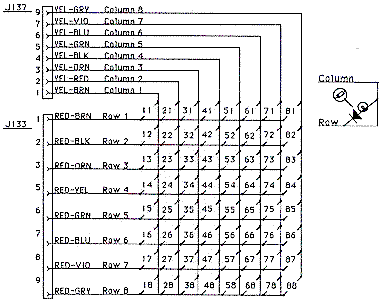
Lamp Matrix (all WPC games)
Column/
Row
1
Yellow-
Brown
2
Yellow-
Red
3
Yellow-
Orange
4
Yellow-
Black
5
Yellow-
Green
6
Yellow-
Blue
7
Yellow-
Violet
8
Yellow-
Gray
1 Red-
   Brown
11
21
31
41
51
61
71
81
2 Red-
   Black
12
22
32
42
52
62
72
82
3 Red-
   Orange
13
23
33
43
53
63
73
83
4 Red-
   Yellow
14
24
34
44
54
64
74
84
5 Red-
   Green
15
25
35
45
55
65
75
85
6 Red-
   Blue
16
26
36
46
56
66
76
86
7 Red-
   Violet
17
27
37
47
57
67
77
87
8 Red-
   Gray
18
28
38
48
58
68
78
88

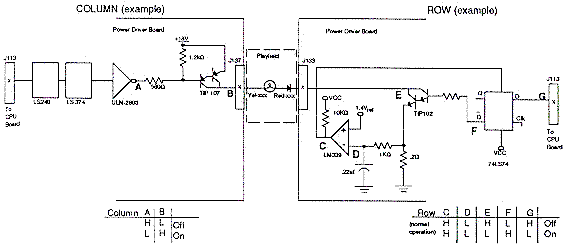
    • Feature Lamp circuit: To turn a lamp on, the processor sends a signal to the ULN2803 causing the output (point A) to toggle low. This causes the TIP107 transistor to conduct +18 volts, and it's output (point B) to go high. At the same time, the CPU board (point G) drops the output of a 74LS74 (point F) to go high. This causes the TIP102 transistor to conduct and the collector of the TIP102 (point E) to go low. When there is a high state on the TIP107 (point B) and a low stated on the TIP102 (point E), this completes the circuit to a lamp and the lamp lites.

      The microprocessor shuts off the lamp circuit by changing point G to high. However, in overcurrent conditions the lamp circuit is shut off through the comparator (this is known as "strobing"). While the lamp is on, the .2 ohm resistor acts as a current sensor and the 1k ohm resistor and .22 mfd capacitor act together as a filter. These components monitor the row circuit and send a voltage signal to the input of the LM339 (point D). If the voltage at point D rises above 1.4 volts the output of the LM339 (point C) goes low, which is fed back to the 74LS74 and shuts the row circuit off. Once the row is shut off through the comparator, the processor must signal the 74LS74 to enable the row circuit again.

Lamp matrix circuit.

Lamp matrix rows and columns.

    • Solenoid circuits: there are four types of solenoid circuits. High power, low power, flashlamp and general purpose. Most solenoids are pulsed (pulsed power output). Some solenoids are left on (relays and motors) for a specific time.
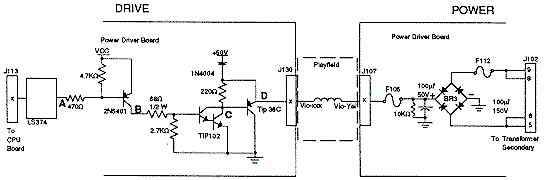
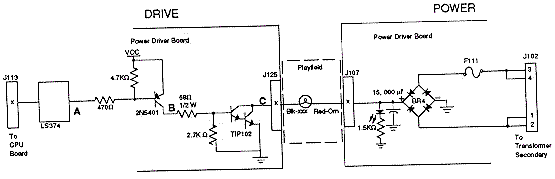
    • High power solenoids: operated from +50 volts unregulated power and generally use a AE-26-1200 coil. This circuit contains a TIP36 driver transistor and a 1N4004 tieback diode to dissipate the coil induced voltages. Solenoids 1 to 8 are high power solenoids.

      The microprocessor toggles the output of a 74LS374. When the 74LS374's output (point A) drops low, the collector of the pre-driver 2N5401 (point B) is high. This causes the collector of the TIP102 (point C) and the emitter of the TIP36 (point D) to drop low. This grounds the coil and the coil is turned on. The coil shuts off when the output of the 74LS374 (point A) goes high.

High Power Solenoid Circuit

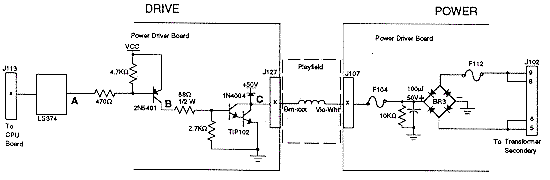
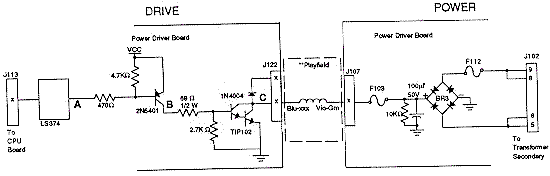
    • Low power solenoids: operated from the same +50 vdc unregulated power supply as the high power solenoids. This circuit generally uses a AE-26-1500 coil and has a tieback diode to dissipate the coil enduced voltage. Solenoids 9 to 16 are low powered and use a TIP102 driver transistor.

      The microprocessor toggles the output of a 74LS374 (point A) low, which makes the pre-driver 2N5401 collector (point B) go high. This causes the TIP102 collector (point C) and go low. This turns on the ground for the coil, which turns the coil on. The coil is shut off when the 74LS374 (point A) goes high.

Low Power Solenoid Circuit

    • Flashlamps: operates on +20 volts unregulated DC. This circuit works the same as the other solenoid circuits, except it does not use a tieback diode. Drivers 17 to 20 are flashlamps.

      The microprocessor toggles the output of a 74LS374 (point A) low. This turns on the pre-driver 2N5401 and the collector (point B) goes high. This causes the TIP102's collector (point C) to go low and complete the ground to the flashlamp. When the 74LS374 (point A) goes high, the circuit shuts off.

Flashlamp Circuit

    • General purpose Coils: these are a cross between the low power coils and flashlamps. The tieback diode is optional and determined by the wiring harness. If the general purpose solenoid is used as a coil driver, the diode is connected to +50 volts. If the general purpose solenoid is used as a flashlamp, the circuit operates +20 unregulated volts DC and the tieback diode is not connected. Solenoids 21 to 28 are the general purpose solenoids.

      As with the other solenoid circuits, the microprocessor toggles the output of a 74LS374 (point A) low. This turns on the pre-driver 2N5401 and the collector (point B) goes high. This causes the TIP102's collector (point C) to go low and complete the ground for the flashlamp or coil. When the 74LS374 (point A) goes high, the circuit shuts off.

General Purpose Solenoid Circuit. Tieback diode (next to point C) not used
when flashlamp is driven.

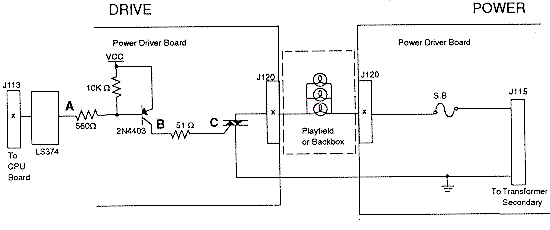
    • General Illumination (GI): contains five separate strings of up to 18 bulbs per string, with a maximum of 90 bulbs. The circuit uses 6.3 AC volts, which comes from the transformer, to the power driver board, through a fuse, through a Triac (except for two strings in WPC-95), and to the playfield. The five strings are controlled by a Triac (except on WPC-95, where only three strings are Triac controls and two are static), and the Traics are controlled by the microprocessor. The microprocessor does this through through a latch that it uses to store control signals.

      The Triac-controlled GI strings can be dimmed. The microprocessor has the ability to know when the AC line voltage is passing through a zero cross. Dimming is achieved by the microprocessor sending a control signal to the 74LS374 latch, which turns the triac on after the zero cross has been detected. The longer the delay, the dimmer the bulbs. This dimming effect is known as 'duty cycling' the triacs/lamp strings at different frequencies. The trigger event for the timing is the zero-crossing circuit (which switches 120 times per second as the AC wave passes through zero volts).

      To turn the bulbs on without dimming the microprocessor sends a control signal to the triac, and leaves the signal applied. When the 74LS374's output (point A) goes low, the collector of the 2N4403 (point B) and the triac (point C) go high. This turns the triac on, which turns on its general illumination string.

General Illumination (GI) circuit.

    • Flipper Circuit: on pre-Fliptronic WPC games, the microprocessor enables a relay to close on the solenoid driver board. This enables a path to ground for the flippers. Flippers operated on +50 volts. An unloaded flipper has about 60 volts or greater. Loaded coils have about 48 volts. Fliptronic WPC games do not use this relay, and the CPU board can control the flipper directly through the Fliptronics board.

    • Power Circuits: the power driver board supplies +5 vdc for the logic circuits, +12 vdc for the switch matrix and motors/relays, +18 vdc for the controlled lamps (lamp matrix), +20 vdc for the flashlamps, +50 vdc for the solenoids, and 6.3 vac for the GI. The +5 and +12 volts (switch matrix) takes the secondary AC voltage from the transformer and routes it to a bridge rectifier and capacitor. This converts the AC to unregulated DC. Then the unregulated DC goes through a voltage regulator which regulates the DC voltage. The +12 volt power, +18, +20 and +50 volt circuits are unregulated. The AC voltage from the transformer secondary goes to a bridge rectifier and capacitor, then to the necessary circuit. The 6.3 volts AC goes through the triacs and fuses, and then to the bulbs.

    High Line/Low Line Voltage Detection Circuit.
    WPC uses the +18 volts power circuit to monitor the AC line voltages for high or low line conditions. This circuit consists of a LM339 comparitor and two LEDs and a voltage divider. None of the controlled lamps can be on when checking the LEDs for proper voltage (have the game in test mode, not attract mode).

    • Voltage Ok: LED2=On, LED3=Off
    • Voltage High: LED2=Off, LED3=Off (go up on transformer tap)
    • Voltage Low: LED2=On, LED3=On (go down on transformer tap)

    Dot Matrix Controller Board.
    The dot matrix controller board provides the voltages for the display, and interfaces the display with WPC.

    The CPU writes a bit mapped image into RAM on the dot matrix controller board and can control which page area is displayed. The bit mapped image corresponds to the points on the dot matrix display. The RAM can store 16 full display images at one time. There are three 74LS175 page registers that give the CPU access to the RAM. The high and low page registers are accessed directly by the CPU. These page registers point to one of the 16 RAM areas each, for the CPU to read and write from. The third page register points to the RAM area which is actively displayed. There is one additional register that allows the CPU to know which row of the display the controller is currently updating. The dot matrix controller automatically mutiplexes and refreshes the screen according to the data in the RAM. The system clock controls access to RAM so there are no wait states.

    The voltages necessary (except for +5 which is supplied by the power driver board) for the dot matrix display are provided by the dot matrix controller. The voltages are regulated DC +62 (power), +12 (logic), -125 (power), -113 (logic; -125 plus -113 gives +12 volts).

    A 74HCL138 decoder at U1 selects whether to access the RAM (port) or Registers (control). Another 74HCT138 at U2 selects which registers to access.

    The RAM circuit uses 74LS175's at U33 and U35 to control which page the system accesses. 74LS175's at U31 and u32 control which page is displayed. 74LS157 chips at U25, U26, U27 multiplex the access to the RAM between the controller board and the system according to the "E" clock. If the E clock is low, the system has access. If the E clock is high, the controller has access.

    The control logic uses 74HCT161 chips at U10, U11, U12 to start the row scan. 74HC193 chips at U13, U14, U15 address the sequence of bits on the serial port to the display. U22, U21, U5 generate the interupt on a row being displayed which is determined by the system. U23, U6 function together as a row 1 detect circuit.

    Dot Matrix Diplay/Driver Board.
    The dot matrix display and attached driver board has a 128 column and 32 row gas discharge display unit. The column drivers have output latched so that the column data for the following row can be entered while the present is being displayed. The requires three positive and two negative voltages, a clock signal, and serial data similar to the type used to drive CRT displays.

    Sound Board.
    The sound board produces all the music, sound and speech for a game. It has its own microprocessor (6809) running at 8 mHz to control and process data. It also uses 2064 RAM for temporary storage.

    There is a DAC circuit which produces the standard game sounds (anything that is not speech or music). The DAC gets its information in digital format, converts it to analog, and send it to an amplifier.

    There is also a speech circuit and a mixer cirucuit. The mixer circuit take the sound, DAC, and speech circuits and mixes them together. The mixed sound is sent to a MC3340 attenuator which controls the volume. Then the signal goes to the power amp which amplifies the sound before being sent to the speakers.


1i. Getting Started: Troubleshooting (quick guide)
    This section is right from a 1991 Williams' "WPC theory of operation" manual (#16-9289). Since this manual is from 1991, DCS sound, fliptronics, and WPC-S and WPC-95 are not explicitly covered. But much of this information still applies to these newer WPC revisions.

    CPU board Troubleshooting.
    The CPU has three LEDs located on the upper left side of the board (labeled D19, D20, D21). On game power on, D19 and D21 turn on for moment. Then D19 turns off and D20 starts to blink rapidly. D21 remains on. The system has detected a problem if:

    • D20 blinks one time: ROM error U6
    • D20 blinks two times: RAM error U8
    • D20 blinks three times: Custom chip U9 failure

    CPU Problems and Potential Solutions.

    1. The game stays in Factory Settings or displays says "Factory Settings Restored".
      This indicates that the CMOS RAM on the CPU board is no longer retaining it's custom settings, and has reverted back to the default settings. The three AA batteries are dead or not making good contact. Discussed further down in this repair document.
    2. Game displays "Time and Date Not Set".
      The real time clock is not running, or the three AA batteries are dead or not making good contact.
    3. U6 Checksum Error.
      Check chip U6 and socket for bent pins or cold solder joints. U6 is the main program EPROM for the game.
    4. The CPU is dead.
      Very difficult to determine the cause. Biggest problem is that the address and data lines are almost always stuck low or floating. Check for +5 volts and proper ground. Check for a solder short or cold solder joints under any chip or socket. Check latches for activity. There should always be square waves about 4 volts peak to peak on the outputs. Check that the 8mHz and 32kHz clocks are running. If all else fails, swap U4, U6 and U9 one at a time to try to issolate the problem.

    Switch Circuit problems and potential solutions.

    1. Game comes up, but accepts no coins and won't start a game.
      Check fuse F115 on the power driver board. Check switch #13, the start button, on the cabinet. The white-orange and green-brown wires must be connected to the switch blades. Check CPU connector J206, J207, J208, J209 for contamination. Check U20, pin 1; it should be high and pin 18 should be low. Check U18 pins 5, 2 which should be low. Check D5.
    2. All the switches in one column are either dead or active at the same time.
      Check U20 and U14. Check that the switch column wire is not shorted to ground.
    3. All the switches in one row are either dead or active at the same time.
      Check the corresponding 1N4148 diode and LM339 comparator. Check U13 and U15.
    4. The game won't go into diagnostics.
      Check the diagnostics switch on the coin door. Be sure the ground wire is connected. Check U15 and J16. Check connector J205 for contination.
    5. Two or more unrelated switches act together.
      Check for a defective diode on the switches and that none are touching metal. Check for solder shorts on the CPU in the switch circuit.
    6. The game comes up with "Check Switch #" in the display.
      Indicates that the switch shown has not been activated in about 30 games. Check the LM339 that controls that switch, and check U20. Be sure the wires or the diode have not broken off. The game compensates for an inactive switch to allow nearly normal game play.
    7. The Games says "Pinball Missing".
      A pinball is missing or stuck on the playfield. Another cause could be the outhole switch is not working. Check the wires and diode on that switch. Check U20 and the LM339 that controls the outhole switch.
    8. The game says "## Switch is stuck On".
      This indicates that a switch which is normally off is stuck on. This switch is essential for game play (coin chute or tilt). Be sure the switch has the column and row wires attached, and not shorted.
    9. Game says "Wht-xxx Row x Short".
      This indicates a switch row is shorted to ground. Check that the coin door switch is not touching the ground coin door. Check that a leaf switch on the playfield is not touching a grounded playfield part.
    10. The game won't go into Game Over mode.
      Check the outhole switch. Be sure the wires are not broken. Check U20 and the LM339 and switch diode.
    11. Flipper switches (11 and 12) do not register.
      On pre-Fliptronics WPC games, this can be caused by either chips U7 or U8 (4n25) opto-isolators on the power driver board, or by U20 or U18 on the CPU board.
    12. Pre-Fliptronics WPC game's flipper lane change doesn't work.
      This is almost always driver board chips U7 (left flipper) or U8 (right flipper) which are the 4n25 opto isolators. Note on later Fliptronics games these chips were no longer used and were removed from the driver board, along with the flipper relay.

    Lamp Circuit problems and potential solutions.

    1. None of the lamp matrix (controlled) lamps work.
      Check LED6 on the power driver board. If it is off, check F114 and BR1. If it is on, check U9 and U18. Both chips should have high pulses on the outputs. Be sure the +18 volt wire is not broken. In rare cases, the transformer winding for the +18 volts can fail.
    2. A lamp row is either very bright or dead.
      The TIP102 for that row is most likely dead or locked on. The LM339 comparator is the next component to check. Occasionally the 74LS74 can cause a problem. Hint: a fast way to tell if the TIP102 transistor is defective is to ground the tab of the transistor. If grounding the tab and nothing happens, the transistor is probably good. If grounding the tab and the row lights, the transistor is probably bad.
    3. A lamp column stays on all the time.
      Most likely the column's TIP107 transistor is bad.
    4. A lamp row stays on all the time.
      Most likely the row's TIP102 transistor is bad.
    5. A few unrelated bulbs never turn on.
      Check the bulbs and the sockets. Be sure the column and row wires are soldered to the socket. If bulb is mounted in a PC board, check the male pin connectors on the board for bad or cold solder joints.
    6. All the lamps stay on and never turn off.
      Most likely U9 is defective. Note U18 could have failed at the same time.

    Coil problems and potential solutions.

    1. None of the +50 volt solenoids turn on.
      Check fuse F112 and bridge BR3. A shorted BR3 can also blow the game's main power fuse too (this may all happen when the coin door is closed).
    2. I have a motor or relay that doesn't work.
      Check fuse F103, the TIP102 transistor that drives the motor or relay, and the wires going to the device. The device itself can also be defective.
    3. I have a coil that won't kick.
      Check the TIP36 and/or the TIP102 transistor that drives the coil. Check the 2N4403 pre-driver transistor. Be sure a wire hasn't broken from the coil. Check the +50 volts from the power side of the coil to ground. It is possible, but unlikely, that the 74LS374 latch could fail. Hint: a fast way to tell if a TIP102 transistor is defective is to ground the tab of the transistor. If grounding the tab and nothing happens, the transistor is probably good. If grounding the tab and the coil kicks, the transistor is may be defective (assuming the coil doesn't work in game or test mode).
    4. I have a coil that stays energized.
      The TIP36 and/or TIP102 transistors may have failed and locked on. Check the 2N4403 driver transistor too. For this problem, grounding the tab of the transistor will not help determine the problem.
    5. A coil has burned.
      If there is a burnt coil on the playfield, there is probably damage to the power driver board too. If the coil is replaced before checking the power driver board, the new coil could be damaged.
      The coil itself could be defective too. Or the 74LS374 latch or driver transistor(s) could have shorted and caused the coil to stay energized. Another problem could be the BR3 bridge. However, if BR3 fails fuse F112 usually also blows (and there's more than one coil effected). This can also cause the game's main power fuse to blow too (which may not happen until the coin door is closed).
      Be sure that the coil is not touching a grounded metal part under the playfield. Or that there is not a mechanical problem holding the coil in the energized position.
    6. Two or more coils activate at the same time.
      Check for clip shorts on the power driver board. Check the 74LS374 latch that controls the coils. Check for a short under the playfield between the drive wires of the coil.
    7. Fuse F111 or F112 or the Main Power fuse blows.
      The BR3 or BR4 bridge(s) are defective. Another cause is a shorted flashlamp socket or a shorted coil. A defective relay or motor will also cause this. Note: if F111 or F112 blows more than once there is probably damage on the power driver board. Either of those fuses will blow first, but also the game's main power fuse can blow too (which may not happen until the coin door is closed).

    Flashlamp problems and potential solutions.

    1. I have a flashlamp that never lights.
      Check the bulb. Check the TIP102 transistor that drives the flashlamp. Be sure the wires that go to the flashlamp socket are not broken. The 2N4403 pre-driver transistor can also cause this problem.
    2. I have a flashlamp that is always On, and/or that is very bright.
      Check the TIP102 and 2N4403 transistors that drive the flashlamp. The 74LS374 latch sometimes causes a flashlamp to stay on.
    3. None of the flashlamps turn on.
      Check for +20 volts at the bulb socket. Check fuse F111 and bridge BR4. F111 is probably blown.
    4. One or two flashlamps seem to burn out more often than the rest.
      There is probably more than +20 volts getting into the flashlamp circuit. Check the voltage from the flashlamp to ground. If there is more than +20 volts, one of the wires going to that bulb is coming in contact with another voltage section. If the voltage is correct, then the TIP102 transistor is probably bad.

    General Illumination problems and potential solutions.

    1. A single GI string of bulbs doesn't turn on.
      Check the fuse that controls that string. If the fuse is good, check to see if there is voltage at the bulb sockets. If there is no voltage, the wire going from the fuse to the bulbs is open. If there is voltage, check the triac that drives the GI string.
    2. None of the GI bulbs turn on.
      Check the 74LS374 latch. Check for 6.3 volts AC coming to the power driver board from the transformer.
    3. A single GI string doesn't dim.
      Most likely the triac that controls that string is defective. The 74LS374 latch might cause this problem.
    4. None of the GI strings dim.
      Most likely the 74LS374 latch or the zero cross circuit is defective. If the zero cross circuit is defective, it probably the LM339 comparitor. In rare cases the microprocessor would cause such this problem.
    5. The GI strings don't turn off.
      The zero cross circuit is the problem. Most likely the LM339 comparitor is defective. In rare cases the microprocessor would cause such this problem.

    Power circuit problems and potential solutions.
    If any of the power circuits on the power driver board fail, check the corresponding fuse first. If this isn't the problem, or a new fuse blows immediately, check the circuit's bridge rectifier BR1 and voltage regulator. Other possibilities:

    1. Shorted G.I. socket can cause F106-F110 to blow.
    2. Shorted flashlamp socket can cause F111 to blow.
    3. Shorted coil can cause F101-F105 and F112 to blow.
    4. A +5 vdc short to ground can cause F113 to blow.
    5. Shorted controlled lamp socket or caps C6/C7 can cause F114 to blow.
    6. Defective U20 can cause F115 to blow.

    Alphanumeric display problems and potential solutions.
    Since the display driver and the dual or single display boards are separate boards, the first thing to do when troubleshooting is to swap the boards to isolate the problem.

    1. Segments are missing.
      Usually caused by a defective UDN-7180. The 74LS374 could also fail along with the UDN-7180.
    2. Digits are missing.
      Usually caused by a defective UDN-6118. The 74LS240 could also fail along with the UDN-6118.
    3. No displays.
      Check fuse F301. Be sure to have +/- 90 volts.
    4. Digits strobe slowly across the display.
      The +/- 90 volts had dropped down to about +/- 30 volts. Check the power supply circuit on the display driver board.
    5. Segments bleed into one another.
      One of the ribbon cables from the display driver board to the single or dual display boards is on backwards.

    Dot matrix display problems and potential solutions.

    1. Dots are missing from the display.
      Check the display glass for a disconnected or broken or mis-soldered pin.
    2. Columns are missing from the display (in blocks of 32).
      One or more of the column drive chips are defective.
    3. No display at all.
      Display/driver board is defective, or the correct voltage is not being supplied by the controller board.
    4. The display is unreadable.
      The RAM on the controller board is defective.
    5. The display repeats the wrong pattern.
      One or more of the latches going to the RAM on the controller board are defective.

    Sound problems and potential solutions.

    1. No sound.
      Usually the AD7524 DAC is defective.
    2. No speech.
      Usually the 55536 CVSD, or the TL040 op-amp, or the TL082 op-amp are defective.
    3. The speech is distorted.
      Usually a defective 55536 CVSD, or a defective 74LS74.
    4. No music.
      Usually the YM3012 or the YM2151 are defective.
    5. The volume level is too low and the volume control is not the problem.
      Check the TL084 and the TL082 op-amps.
    6. No output at all.
      The LM1875 audio amp is probably defective. This amp should have -26 volts on pin 3, and +26 volts on pin 5. Anything else indicates a problem. The sound ROM or RAM could be defective. There should be high pulses on the output pins of the Sound ROM and RAM. The MC3340 attenuator can also cause this problem.
    7. The board is dead.
      There is probably no +12 or -12 volts. Check fuse F501 and F502.
    8. Sound Board Error codes at game power-on:
      • 1 beep = sound board Ok
      • 2 beeps = U9 RAM failure
      • 3 beeps = U18 ROM failure
      • 4 beeps = U15 ROM failure
      • 5 beeps = U14 ROM failure


2a. Before Turning the Game On: Check the Fuses/LEDs - Blown Fuses and What Causes them

    Click here for detailed information on the "Check Fuse F114/F115" or "Check Fuse F106/F101" (WPC-95) error messages.

    Check every fuse, and remove it and check it with a meter! Do NOT try and check fuses visually. Remove the fuse from the game, as often the fuse's infrastructure (glass to metal ends) has failed (though the fuse may still be intermittently working). If the fuse falls apart as it is removed, that's a good indication there's a problem.

    Seems like such a simple thing, yet many of us forget to do it. Before turning the game on, check the fuses. Not only look for blown fuses, but especially over-fused circuits. For example, is there an 8 amp fuse where there should be a 5 amp? Is there a slow blow fuse where there should be a fast blow?

    Most of the fuses for a WPC game are located in the backbox. The majority of which are on the driver board. There are a few fuses on the other boards too, and a line fuse at the front of the game.

    A Particular Fuse Keeps Blowing in my Game when I Power-on.
    First determine if a failing fuse is caused by a circuit board. The easiest way to do this is to disconnect the playfield from the board(s). This can be done by unplugging the appropriate circuit board connectors, and see if the fuse still blows.

    For example, say fuse F105 keeps blowing on a WPC game. Looking at the schematics shows this is the high power solenoid fuse, and provides power to connectors J105 (cabinet), J106 (backbox), and J107 (playfield). Remove these connectors, replace fuse 105, and turn the game on. If the fuse does not blow, the problem is not on the circuit boards. If the fuse still blows, the problem is on the driver board.

    If the fuse does not blow with the connectors removed, this procedure can be taken a step further. Replace connectors J105,J106,J107 one at a time, and turn the game on. Notice which connector causes the fuse to blow, and trace this connector to the device(s) in question.

    If the circuit board(s) are causing a failed fuse, often a shorted bridge rectifier will cause a fuse to instantly fail when the game is turned on. See below for which fuse connects to which bridge. See the Game Resets (Bridge Rectifiers and Diodes) section for help with testing bridges. If a solenoid fuse keeps blowing after a game is started, usually that means a related driver transistor had shorted. See the Checking Transistors and Coils section for help with that.

    "I turn my Game On, and a Coil Keeps Firing On and Off - Why?
    Also My DMD is Not Working Too."

    This is a fuse related problem too. Chances are good the fuse for the 12 volts (F116 or F109 on WPC95 most often) that feeds the switch optos has blown. Since there is no light source for the optos, this makes the CPU think the opto switches are closed (like there is a ball stuck in an upkicker). The machine is trying to eject the phantom ball as part of the power-on process. Also maybe the Dot Matrix Display (DMD) is out too with nothing on the display or just a single line or garbage. Some DMD displays need 12 volts to function, some do not (brand dependant). Check all the backbox fuses (on WPC-S and prior, usually this is fuse F116 (or F109 on WPC95), which is the unregulated 12 volt fuse (on WPC-S and earlier via BR5).

    Testing Fuses: the Right Way.
    Don't depend on your eyes or sense of smell to check fuses. A perfectly good looking fuse could be blown, it happens all the time. Use a Digital Multi-Meter (DMM). With the game off, first remove the fuse from its holder, (or at minimum remove just one end of the fuse from the holder). Don't try and test the fuse installed as it can give false readings, depending on the circuit. Set the DMM to "continuity", put a lead on each end of the fuse, and buzz out those fuses. No buzz means fuse is bad.

    (Side Note: a "buzz" on the DMM meter means zero resistance. If there is no "buzz", either the circuit is OPEN, or the resistance is 100 ohms or greater. If the meter doesn't have a continuity function, just use the lowest resistance setting. A good fuse will measure zero ohms.)

Removing a fuse with a small screwdriver. Note the screwdriver is
at the end of the fuse, and is pulled away from the board to release
the fuse. Do not pry the fuse out at the metal fuse clip, as this will
bend the fuse clip and basically ruin the fuse holder.

    Yes a fuse can be tested in the game with the power on, and without removing it. But don't do it! Remove all the fuses, inspect them for the correct value and good condition, and test them with a DMM set to resistance. All fuses should be check before the game is even powered on for the first time. And working on a game with the power on is just not a good idea for most people, as it can lead to other problems.

    Another Reason to Pull a Fuse from its Holder to test it.
    Always remove a fuse from its holder to test it. Do this because a particularily fatigued fuse will often fall apart as taken out of its holder. This may never be seen if the fuse is tested in its holder. This is especially true if the fuse tests 'good' then the fuse wire pulls away from an end-cap as it heats up. For this reason, regardless of the convenience, all fuses should always be pulled from its holder for testing. Also removing the fuse forces the user to examine the fuse holder and its condition too.

    Smaller Fuses in WPC-95 Games.
    With WPC-95 Williams changed to the smaller international ISO size (.75" or 5x20mm) GMC "T" fuses 250 volts (but 125 volt fuses work fine too). The "T" designation means "timed delay", or in other words, it's a slow-blow style fuse. Note there are also GMA "F" (F means "fast blow") fuses, but part WPC-95 games only use slow-blow GMC "T" fuses. As for the "T" and "GMC" terminology, Buss uses the "GMC" and Littlefuse uses the "T" terminology ("T" and "GMC" are the same thing). WPC-S and earlier games used the older American 3AG or AGC 1.25" size fuses. Since Williams exports over 50% of their production outside of North America, it made sense to change. The 5x20mm fuses take up less space on the circuit boards too.

    WPC-S and Prior Driver Board LEDs, Test Points (TP), and Fuses.
    For reference, TP5 is ground.

    • LED1/TP3/BR1: +12 volts DC regulated circuit. Should be always ON. If off, check fuse F115. This is often caused by a bad CPU board chip U20 (see the switch matrix section for more details). The AC Power originates at connector J101 pins 4,5 and 6,7. It then goes through fuse F114, bridge BR1, capacitors C6 and C7, LED6/TP8 (18 volts DC), diodes D1 and D2, voltage rectifier Q2, fuse F115, LED1/TP3 (12 volts DC), then to connector J114 pins 1,2. Also, just before diodes D1 and D2, the circuit splits to the LM339 chip U6, and LED2/LED3.
    • LED4/TP2/BR2: +5 volts DC digital circuit. Should be always ON. If off, game will not boot. Check fuse F113 (or bridge BR2 and capacitor C5). Though not likely to fail, there is also a voltage regulator LM323 at Q1, a LM339 chip at U6 ("zero cross"), and two 1N4004 diodes at D3 and D38. The AC Power originates at connector J101 pins 1 and 2. It then goes through fuse F113, bridge BR2, capacitor C5, voltage rectifier Q1, LED4/TP2 (5 volts DC), then to connector J114 pins 3,4. Note after fuse F113, the AC power also continues to diodes D3 and D38, and to LM339 chip U6. Then this "zero cross" power merges back into the +5 volt line before hitting connector J114.
    • LED5/TP7/BR4: +20 volts DC flashlamp circuit. Normally ON. Twilight Zone and later, this LED fades off when the coin door is opened. If off, check coin door and fuse F111 (or bridge BR4 and capacitor C11). The AC Power originates at connector J102 pins 1,2 and 3,4. It then goes through fuse F111, bridge BR4, capacitor C11, LED5/TP7 (20 volts DC), then to connector J107 pins 5,6 (and J106 and J108).
    • LED6/TP8/BR1: +18 volts DC lamp matrix circuit. Normally ON. If off, check fuse F114 (or bridge BR1 and capacitors C6, C7). Though not likely to fail, there is also a voltage regulator LM7812 at Q2, a LM339 chip at U6, and two 1N4004 diodes at D1 and D2. The AC Power originates at connector J101 pins 4,5 and 6,7. It then goes through fuse F114, bridge BR1, capacitors C6 and C7, LED6/TP8 (18 volts DC), diodes D1 and D2, voltage rectifier Q2, fuse F115, LED1/TP3 (12 volts DC), then to connector J114 pins 1,2. Also, just before diodes D1 and D2, the circuit splits to the LM339 chip U6, and LED2/LED3.
    • LED7/TP1/BR5: +12 volts DC unregulated power circuit (opto light, motors, relays, power to some Dot Matrix Score displays, etc). Should always be ON. If off, check fuse F116 (or bridge BR5 and capacitor C30). The AC Power originates at connector J112 pins 1,2 and 3,5. It then goes through fuse F116, bridge BR5, capacitor C30, LED7/TP1 (12 volts DC), then to connector J118/J117/J116 pin 2.
    • TP6 (no LED)/BR3: +50 volts for the coil. The AC Power originates at connector J102 pins 5,6 and 8,9. It then goes through fuse F112, bridge BR3, capacitor C8, TP6 (50-70 volts DC), then fuses F103/F104/F105 (and F102/F102), then to connector J107, J106 J108, and J109.
    • LED2 (no TP): This LED is not always installed. High/low line voltage sensor. Normally ON, but flickers with the playfield lamps.
    • LED3 (no TP): This LED is not always installed. High/low line voltage sensor. Normally OFF, but flickers with the playfield lamps.

    WPC-95 Driver Board LEDs, Test Points (TP), and Fuses.
    For reference, TP107 is ground.

    • LED100/TP100: +12 volts DC regulated. Should be always ON. If off, check fuses F101 and F106 (or diodes D11-D14 and capacitors C11, C12). If fuse F101 has failed, this is often caused by a bad CPU board chip U20 (see the switch matrix section for more details). Though not likely to fail, there is also a voltage regulator LM7812 at Q2, and two 1N4004 diodes at D1 and D2. If fuse F101 has failed, suspect the voltage regulator Q2. The AC Power originates at connector J129 pins 6,7 and 4,5. It then goes through fuse F106, diodes D11-D14, capacitors C12,C11, LED102/TP102 (18 volts DC), diodes D1-D2, voltage rectifier Q2, fuse F101, LED100/TP100 (12 volts DC), then to connector J101 pins 1,2.
    • LED101/TP101: +5 volts DC digital. Should be always ON. If off, game will not boot. Check fuse F105 (or diodes D7-D10 and capacitor C9). Though not likely to fail, there is also a voltage regulator LM317 at Q1, a LM339 chip at U1, and two 1N4004 diodes at D23 and D24. The AC Power originates at connector J129 pins 1 and 2. It then goes through fuse F105, diodes D7-D10, capacitor C9, voltage rectifier Q1, LED101/TP101 (5 volts DC), then to connectors J101 pins 3 and 4, J138 pin 4, J139 pin 4, J140 pin4, J141 pin 4.
    • LED102/TP102: +18 volts DC lamps. Normally ON (can flicker with playfield lamps). If off, check fuse F106 (or diodes D11-D14 and capacitors C11, C12). The AC Power originates at connector J129 pins 6,7 and 4,5. It then goes through fuse F106, diodes D11-D14, capacitors C12,C11, LED102/TP102 (18 volts DC), diodes D1-D2, voltage rectifier Q2, fuse F101, LED100/TP100 (12 volts DC), then to connector J101 pins 1,2.
    • LED103/TP103: +12 volts DC un-regulated for opto lights, motors, etc. Should be always ON. If off, check fuse F109 (or diodes D3-D6 and capacitor C8). The AC Power originates at connector J127 pins 1,2 and 3,5. It then goes through fuse F109, diodes D3-D6, capacitors C8, LED103/TP103 (12 volts DC), then to connectors J138 pin 2, J139 pin 2, J140 pin 2, J141 pin 2.
    • LED104/TP104: +20 volts DC flashlamps. Normally ON. This LED fades off when the coin door is opened. If off, check coin door and fuse F107 (or diodes D15-D18 and capacitor C10). The AC Power originates at connector J128 pins 1,2 and 3,4. It then goes through fuse F107, diodes D15-D18, capacitors C10, LED104/TP104 (20 volts DC), then to connectors J133 pin 5 and 6, J134 pin 5.
    • LED105/TP105: +50 volts DC coils. Normally ON. This LED fades off when the coin door is opened. If off, check coin door and fuse F108 (or diodes D19-D22 and capacitor C22). The AC Power originates at connector J128 pins 8,9 and 5,6. It then goes through fuse F108, diodes D19-D22, capacitors C22, LED105/TP105 (50-70 volts DC), fuses F102, F103, F104, then to connectors J134 pins 1,2,3, J135 pins 1,2,3.

    Summary of Typical Fuses that Blow, and What Causes it.
    WPC-S and prior games:

    • Line Fuse (main power fuse): Located in the metal power box just inside the coin door, if bridge rectifier BR3 is blown, this fuse can fail immediately at power up. Also if the varistor inside the metal power box is shorted, this fuse will blow. And finally, if a bridge rectifier on the fliptronics board is blown, this can also cause the line fuse to blow on some games (but only when the coin door is closed!)
    • F101-F102: Bad flipper EOS switch or shorted/mis-wired flipper coil (pre-Fliptronics), or shorted coil or driving transistor.
    • F103-F105: Shorted coil or driving transistor.
    • F106-F110: Shorted general illumination socket.
    • F111: Shorted bridge BR4 or shorted flashlamp socket.
    • F112: Shorted bridge BR3. Can also make the game main line fuse to blow.
    • F113: Shorted bridge BR2 or +5 vdc shorted to ground.
    • F114: Shorted bridge BR1, shorted cap C6 or C7, or shorted controlled lamp socket.
    • F115: Defective CPU board chip U20 and maybe CPU chip U14.
    • F116: Shorted bridge BR5 or shorted motor or shorted opto light or other 12 volt device on playfield or backbox, or even some Dot Matrix displays.

    WPC-95 games:

    • Line Fuse: Located in the metal power box just inside the coin door, if one of the driver board diodes D19-22 is blown, this fuse can fail immediately at power up. Also if the varistor inside the metal power box is shorted, this fuse will blow. And finally, if a bridge rectifier on the AV board is blown, this can also cause the line fuse to blow on some games (but only when the coin door is closed!)
    • F101: Defective CPU board chip U20 and maybe CPU chip U23.
    • F102-F104: Shorted coil or driving transistor.
    • F105: Shorted diode D7-D10 or +5 vdc shorted to ground.
    • F106: Shorted diode D11-D14 or shorted controlled lamp socket.
    • F107: Shorted diode D15-D18 or shorted flashlamp socket.
    • F108: Shorted diode D19-D22.
    • F109: Shorted diode D3-D6 or shorted motor or shorted opto light or other 12 volt device on playfield or backbox.
    • F110-F114: Shorted general illumination socket.
    • F115-F118: Shorted or mis-wired flipper coil.

    In-Depth Fuse/Voltage/Bridge Explainations.
    WPC-S and Earlier:
    Line Fuse: Value/type depends on the game's main voltage. If there is a problem as the line cord or power box, this fuse blows. Also if bridge rectifier BR3 is bad, it can blow this fuse. If a bridge rectifier on the fliptronics board is blown, this can also cause the line fuse to blow on some games (but only when the coin door is closed!) This happens because some games use power from the Fliptronics board to power the flipper and other coils too. For domestic games, usually 8 amp fast blo 1.25" fuses (check game manual).

    Driver Board for WPC-S and Earlier
    These games use standard American 1.25" fuses.

    • F101: usually 2.5 amp slo-blo (non-Fliptronic) or 3 amp slo-blo (Fliptronic). 50 volts. Used for left flipper on non-Fliptronic games (bad EOS switch can cause this fuse to blow). Used for other solenoids on Fliptronic games. A shorted or locked-on coil can cause this fuse to blow.
    • F102: usually 2.5 amp slo-blo (non-Fliptronic) or 3 amp slo-blo (Fliptronic). 50 volts. Used for right flipper on non-Fliptronic games (bad EOS switch can cause this fuse to blow). Used for other solenoids on Fliptronic games. A shorted or locked-on coil can cause this fuse to blow.
    • F103: usually 3 amp slo-blo. After bridge BR3. Used for 50 volt continuous duty solenoids 25 to 28. A shorted or locked-on coil can cause this fuse to blow.
    • F104: usually 3 amp slo-blo. After bridge BR3. Used for 50 volt lower power solenoids 9 to 16. A shorted or locked-on coil can cause this fuse to blow.
    • F105: usually 3 amp slo-blo. After bridge BR3. Used for 50 volt high power solenoids 1 to 8. A shorted or locked-on coil can cause this fuse to blow.
    • F106, F107, F108, F109, F110: All 5 amp slo-blo. Used for the 6.3 volt General Illumination (GI). A shorted GI lamp socket can cause any of these fuses to blow.
    • F111: 5 amp slo-blo. Before bridge BR4. Used 20 volts flash lamps AC input voltage. A shorted flashlamp socket or bad bridge BR4 can cause this fuse to blow.
    • F112: 7 amp slo-blo. Before bridge BR3. Used for solenoid AC input voltage. A failed BR3 bridge will cause this fuse to blow and perhaps the main power fuse.
    • F113: 5 amp slo-blo. Before bridge BR2. Used for AC input voltage that is converted to regulated +5 volts DC.
    • F114: 8 amp fast-blo. Before bridge BR1. Used for AC input voltage that is converted to +18 volts for the lamp matrix. A shorted controlled lamp socket or bad BR1 bridge rectifier can cause this fuse to blow, or shorted cap C6 or C7.
    • F115: 3/4 amp fast blo. This voltage comes after a voltage regulator (which gets power from BR1). Used for the switch matrix regulated +12 volts. A defective U20 chip (all WPC revisions) on the CPU board can cause this fuse to blow. Also sometimes the U14 chip (on WPC-95, U23) on the CPU board fails in addition to the U20.
    • F116: 3 amp slo-blo. Before bridge BR5. +12 volt unregulated power for opto light, motors, power to some dot matrix displays (brand dependant), etc.

    Fliptronics Board for WPC-S and Earlier
    These games use standard 1.25" fuses.

    • F901: 3 amp slow-blo. Used for lower right flipper.
    • F902: 3 amp slow-blo. Used for lower left flipper.
    • F903: 3 amp slow-blo. Used for upper right flipper.
    • F904: 3 amp slow-blo. Used for upper left flipper.

      NOTE: Sometimes fuses F903 and F904 on the fliptronics board are used for powering other coils, instead of flippers! For example, on Theatre of Magic (which has no upper flippers), F903 and F904 are used for playfield magnet power. This can be really frustrating, and not very obvious.

    Sound Board for WPC-S and Earlier
    These games use standard 1.25" fuses.

    • F501: 3 amp slow-blo. Used for -25 volts.
    • F502: 3 amp slow-blo. Used for +25 volts.

    Dot Matrix Controller Boards for WPC-S and Earlier
    These games use standard 1.25" fuses.

    • F601: 3/8 amp fast-blo. Used for +62 volts.
    • F602: 3/8 amp fast-blo. Used for -125, -113 volts (or -115 and -103).

    WPC-95:
    Line Fuse: Value/type depends on the game's main voltage. If there is a problem as the line cord or power box, this fuse blows. Also if driver board diodes D19-D22 are bad, it can blow this fuse. WPC-95 (domestic): T5.0 amp, "T" small size. WPC-95 (foreign): T4.0 amp, "T" small size.

    WPC-95 Driver Board
    Uses smaller "T" (.75" or 5x20mm) 250 volt fuses.

    • F101: T0.63 amp. Regulated +12 volts, after a voltage regulator.
    • F102: usually T4.0 amp. 50 volt solenoids #9 to #16 to diodes D19-D22.
    • F103: usually T4.0 amp. 50 volt solenoids #1 to #8 to diodes D19-D22.
    • F104: usually T4.0 amp. 50 volt solenoids #25 to #28 to diodes D19-D22.
    • F105: T4.0 amp. +5 volts logic to diodes D7-D10.
    • F106: T5.0 amp. +18 volts lamp matrix poewr to diodes D11-D14.
    • F107: T4.0 amp. Flash lamp power secondary, after diodes D15-D18.
    • F108: T6.3 amp. 50 volt solenoid power secondary, after diodes D19-D22.
    • F109: T4.0 amp. Unregulated +12 volts to diodes D3-D6, for opto light, motors, etc.
    • F110: T4.0 amp. GI#5 white/violet.
    • F111: T4.0 amp. GI#4 white/green.
    • F112: T4.0 amp. GI#3 white/yellow.
    • F113: T4.0 amp. GI#2 white/orange.
    • F114: T4.0 amp. GI#1 white/brown.
    • F115: T4.0 amp. Flippers +50 volts.
    • F116: T4.0 amp. Flippers +50 volts.
    • F117: T4.0 amp. Flippers +50 volts.
    • F118: T4.0 amp. Flippers +50 volts.

    WPC-95 Audio/Video Board
    Uses smaller "T" 250 volt fuses.

    • F501: T2.5 amp. -15 volts.
    • F502: T2.5 amp. +15 volts.
    • F601: T0.315 amp. +62 volts.
    • F602: T0.315 amp. -125 and -113 volts (or -115 and -103).

    Check Fuses F114/F115 (or F106/F101 on WPC-95) Error Message.
    This error message on the score display is a very common problem on WPC games. Not so much because these fuses are blown, but because often these fuses are *not* blown, yet the error message persists.

    If fuse F114 (or F106 on WPC-95) is indeed blown, this usually indicates an open or shorted BR1 bridge (D11-D14 on WPC-95), or cap C6 or C7, or the LM7812 voltage regulator Q2. If this fuse is OK, check fuse F115 (or F101 on WPC-95). If this is blown, typically it is caused by a shorted U20 chip (and possibly U14, or U23 on WPC-95) on the CPU board.

    The way the game determines if fuse F114/F115 is blown is through the game's switch matrix. Looking at the switch matrix chart, it can be seen that switch 24 on every WPC game is named "always closed". This switch 24 is monitored by the CPU's software. If the software see this switch is not closed, it assumes the power to the switch matrix is gone, and hence the F114/F115 (or F106/F101 on WPC-95) fuse error is displayed. The problem with this assumption is that the switch matrix fuse can be fine, but the switch matrix can be otherwise blown, thus giving a false fuse error.

    So the first thing to check are the fuses themselves. If this pair of fuses (F114/F115 or F106/101 on WPC-95) are bad, replace them and power on the game. If they blow immediately, chances are good bridge rectifier BR1 (or diodes D11-D14 on WPC-95) have shorted. This is a fairly common problem. Less common is capacitor C6 or C7 being shorted or a bad LM7812 voltage regulator at Q2.

    Another thing to try is this:

    • Power off.
    • Remove the fuse F115 from the powerdriver board.
    • Insert a new fuse at F114.
    • Switch the game on and see if a fuse blows.

    If the fuse F114 does blow, chances are good either bridge rectifier BR1, or caps C6 or C7 are shorted. Using a DMM and measure the voltage at TP8. This should read about 18 volts - if lower (but more than 2 volts), the caps at C6 and/or C7 are suspect. If fuse F115 blows either the 7812 voltage regulator is bad or there is a short on the playfield.

    If neither F114 (the fuse before BR1) or F115 (the fuse after the 7812 voltage regulator) blows, there are a number of other potential issues. The following checks can be performed with only connector J101 installed (J129 on WPC95) on the power driver board. Make sure J114 and J116/J117/J118 and the ribbon cable are removed (on WPC95 remove J101 and J138/J139/J140/J141). This will remove the playfield and anything that uses regulated 12 volts from the equation.

    First check for voltage at TP8 for 20 volts DC (TP102 on WPC95). If there's voltage at TP8, then the BR1 bridge and C6/C7 caps are fine (D11-D14 and C11/C12 on WPC95). No voltage there and either fuse F114 is bad (fuse F106 on WPC95) or the BR1 bridge is open (diodes D11-D14 on WPC95). Now check for voltage at both sides of D1 and D2 (1n4004). Input is the non-banded side of D1, which should show 20 volts DC. The banded side of D2 should show about 16 volts DC. If nothing here, then the D1/D2 have gone open. Now the unregulated DC voltage goes to Q2 pin 1 (7812), the voltage regulator. Q2 pin 1 should show 16 volts DC. The output of Q2 is pin 2, and this should show 12 volts. If there's input voltage at pin 1 but nothing at output pin 2, replace Q2. Next the (now regulated) 12 volts DC goes to cap C2 which is 100 mfd 25 volts (C40 on WPC95). I have seen this cap leak and fail, and the circuit board trace break at C2, so check that. Finally the 12 volts goes through fuse F115 and to TP3 (F101 and TP100 on WPC95).

    If the F114/F115 (or F106/101 on WPC-95) fuses are good yet the error message still persists, there is a switch matrix problem. As mentioned above, the CPU monitors switch 24 for its "always closed" status. Switch 24 is actually physically closed by having a loop of wiring going from the CPU board connector J212 down to the coin door interface board connector J3. Here the switch matrix column 2 and row 4 are joined together through a 1N4004 diode, band connected to switch column 2 on the interface board. If one of these connectors are disconnected, or the wiring broken to the coin door interface board, the blown fuse error will be displayed (note this is rarely the problem).

    Assuming all is good so far (no blown fuses and CPU board connector J212 and coin door interface connector J3 are attached), the next thing to check is CPU board chip U20 (ULN2803). Often this chip is blown, usually because the solenoid voltage somehow touched a playfield switch. On WPC-S and later games, Williams socketed CPU board U20 because this problem was so common. If U20 has failed, the game will display the F114/F115 (or F106/F101) fuse error (even though these fuses are good). Replace U20 with a new ULN2803 chip (use a socket if one is not there). If the error still persists, replace CPU board chip U14 (74LS374, or on WPC-95 U23, a 74HC237).

    Regarding U14 (74LS374 on WPC/WPC-S) and U23 (74HC237 on WPC-95). For some reason, this chip can die *without* the U20 (ULN2803) failing. This is very strange, as the chip in question is between the ULN2803 and the cpu logic. But it does happen! Just keep this in mind. It doesn't happen a lot, but it does happen.

    Here is a further indepth, step-by-step approach to see exactly what is causing the F114/F115 (or F106/F101) error message, assuming the fuses themselves are *not* blown. With the game on and the coin door closed:

    • Test for AC voltage at J101 pins 4 and 7 (or J129 pins 4 and 7 on WPC-95). A reading of 13 to 18 volts AC should be seen. This is the AC voltage coming from the transformer. If no voltage here, check the Molex connectors around the transformer and at the power driver board.
    • Test for DC voltage at TP8 (or TP102 on WPC-95) and ground. A reading of 16 to 18 volts DC should be seen. If no voltage here, replace BR1 (or D11 to D14 on WPC-95). Also no voltage here can occur because the solder pads are cracked around bridge BR1 (or D11 to D14 on WPC-95). Using jumper wires for BR1 (as described in the Game Resets section) helps prevent this.
    • Test for DC voltage at TP3 (or TP100 on WPC-95) and ground. A reading of 12 volts DC should be seen. If no voltage here, check or replace diodes D1 and D2 (1N4004, all WPC version).
    • If still no voltage at TP3 (or TP100 on WPC-95) and diodes D1/D2 are OK, replace Q2 (all WPC versions) which is a LM7812 voltage regulator for the 12 volts. Also check cap C2 (C40 on WPC95) and the circuit board traces for cracks.
    • If the above still does not fix the problem, replace U20 (all WPC versions) on the CPU board (ULN2803). If U20 died "hard", it could also blow the 74LS374 at U14 (on WPC-95 it's U23, a 74HC237) on the CPU board.
    • If voltage is still not right, or BR1 (or diodes D11-D14 on WPC-95) are REALLY hot, check all the TIP107 transistors on the power driver board. If these test good, check/replace the ULN2803 at U19 (or U11 on WPC-95) on the power driver board, or maybe the 74LS374 at U18 (or U10 on WPC-95) on the power driver board.


2b. Before Turning the Game On: Burnt GI Connectors (and WPC-95 GI Diodes)
    Often when getting a WPC game, after turning it on, the general illumination (GI) lights don't work. This can be caused because the connectors going to the board burned.

The J115 GI connector used up to 1993. The J115 connector
is located on the driver board in the lower left hand corner,
next to the five fuses. Resistance is the result of cold or
fatigued solder joints and smallish connectors with not enough
surface area to handle the GI power requirements. Note the
use of a white connector housing on this early WPC game.

burnt connector

    The transformer converts 120 volts AC to 6 volts. The 6 volts AC goes to connector J115 (or J103 on WPC-95) on the driver board. This incoming voltage goes through fuses (F106 to F110 on WPC-S and prior, F110 to F114 on WPC-95), then the triacs (a type of transistor). The triacs allow the CPU to control the intensity of the GI lights. After the triacs, the AC power goes to connectors J120 and J121 (J105 and J106 on WPC-95), and finally to the playfield lights. As a WPC game is powered on, the GI lamps do not come on until the CPU board has fully booted and initialized the game (except on WPC-95 games, where two of the five GI lamp strings are not triac controlled; they come on immediately as the game is powered on, and their light intensity is not CPU controlled).

    On WPC games (prior to Twilight Zone) with a white J115 connector, this connector will get warm and can actually burn. This happens because the connector pins don't have enough surface area to handle the GI power requirements. The heat from the connector pins will cause the solder joints to fatique which causes resistance (and heat) to increase. The connector pins get so warm they soften the solder. All this causes more resistance, which causes more heat. It doesn't end till the board burns, the fuse heat fatiques and fails, or the connectors pins fall out (or burn!) and open the circuit.

The driver board as seen from the back. Note the cold solder joints
on the right, and the two missing pins that got so hot the solder
melted away.

cold and missing solder joints

    On original WPC games (1990 to 1993), the J115 GI connector pin housings are made of milky white plastic (like all the other connectors). These are IDC made by Panduit known as their Mas-Con series (Panduit is a connector company similar to Molex). Starting with Twilight Zone in 1993, Williams changed to a black hi-temp "Box" Panduit connectors for J115, which are like a Trifurcon version of an IDC connector. The pins inside the connector housing a tri-contact style (though still IDC style). Also the black connector housings has a higher temperature at which the plastic housing will start on fire. This newer black connector is rated at 12.5 amps (with 18 gauge wire) up to 75 degrees Celsius. The older style white housing connectors are rated at 8 amps (with 18 gauge wire) at 20 degrees Celsius, but as temperature increases the connectors' amp rating goes down linear. At 60 degrees Celsius ambient temperature the white housing connectors are de-rated to about 4.5 amps. A fully-loaded G.I. string will draw about 5 amp (using #44 lamps). And 60 degrees Celsius can be a typical WPC backbox temperature for a game that is on all day long. That's why it is common to see G.I. connector failures on high current sources like general illumination and logic power. Thanks to Tony for this amperage info.

    Starting with WPC-95, Williams changed to black hi-temp connector housings all around, thicker GI wires, and upgraded larger wires for the playfield GI circuits (unfortunately the backbox GI wires were still too small).

A burnt J120 connector on a WPC-S game. Notice the gauge of wire
used on connector J120. It's very small compared to the wire used on
connector J121. This also contributes to the burnt connector problem.

WPC-S J121 connector

    Fixing a Burnt Connector.
    Fixing a burnt connector requires more than just replacing the connector! The driver board will need to be removed, and the male header pins replaced. If only the connector housing and connector pins are replaced, the board pins' resistance will still be there (from the cold or fatigued solder joints and tarnished pins). The newly installed connector will burn in short order.

    When replacing the Male Header pins...
    When replacing male header pins on the driver board at connector J115, J120, J121 (or J103, J105, J106 on WPC-95), it's a good idea to check for continuity with a DMM on BOTH SIDES of the driver board. Often the plated through holes on the these GI traces will break. This is not a problem for traces on the solder side of the driver board (since the board is solder there). But it is a problem for traces on the component side of the board. Check for continuity between the front and back solder pads on each GI board hole with a DMM. If there is no continuity, a "solder stitch" will be needed. The stitch is just some stranded wire put through the board hole, and bent over on each side of the board on the solder pad. This connects the component and solder pad traces, as they originally were with the (now broken) plated through hole. After the wire is inserted in the hole, solder it down on the component side of the board. Then installed the new male header pins through the holes (including the one with the solder stitch), and solder all the pins on the solder side of the board.

The solder pad at J115 that is circled does not have continuity between
the component and solder sides of the driver board (the plated through
hole has broken). To fix this, some stranded wires (a "solder stitch")
is inserted through the hole, and soldered on the component side of
the board. Then the new header pins are insert through the holes,
and solder on the solder side of the board.

Above all the pins are soldered except for the "stitched" pin (which
is circled). This pin was soldered right after this picture was taken!

    G.I. Continuity Checks.
    After new male header pins are installed on the driver board, do these DMM continuity checks to make sure there are no broken traces. I stress this must be done, otherwise you'll be wondering why one or more strings of G.I. do not work. As a note, I have never had a problem with a G.I. triac, but I have had plenty of problems with broken G.I. circuit board traces. All continuity checks are done on the component side of the driver board, with the game off, and with connectors J115, J120, J121 and J119 removed. This info only applies to WPC-S and prior driver boards:

    • J115 pin 1 to ground. Note if this connection is broken, wacky GI dimming can occur.
    • J115 pin 2 to fuse F106 (lower left) to J120/J121 pin 11, to J119 pin 1.
    • J115 pin 3 to fuse F110 (lower right) to J120/J121 pin 7.
    • J115 pin 4 to fuse F109 (upper right) to J120/J121 pin 8.
    • J115 pin 5 to fuse F107 (middle left) to J120/J121 pin 10.
    • J115 pin 6 to fuse F108 (upper left) to J120/J121 pin 9.

    • J115 pin 7 to Q10 top leg (triac lower rt). Q10 middle leg to J120/J121 pin2.
    • J115 pin 8 to Q18 bottom leg (triac upper rt). Q18 middle leg to J120/J121 pin1.
    • J115 pin 10 to Q16 top leg (triac lower mid). Q16 middle leg to J120/J121 pin5.
    • J115 pin 11 to Q14 top leg (triac upper mid). Q14 middle leg to J120/J121 pin3.
    • J115 pin 12 to Q12 top leg (triac left). Q12 middle leg to J120/J121 pin6, to J119 pin3.

    J115 G.I. Connector Wiring.
    On games before the black J115 connector plug was used (before Twilight Zone), there were just two input GI wire colors to connector J115: three yellow wires (the GI supply) and four yellow w/white (the GI return). All the yellow wires connect directly to the transformer and are the GI supply. All the yellow w/white wires connect directly to the transformer and are the GI return. Here's the pinout for that:

    • J115 pin 1,7,8,10,11,12 = Yellow w/white (GI return)
    • J115 pin 9 = key
    • J115 pin 2,3,4,5,6 = Yellow solid (GI supply)

Earlier WPC games used just too input GI wire colors to connector J115 (yellow
and yellow/white band). Here's a pictures an unburnt J115 connector.

    Games with black J115 connector plugs (Twilight Zone to Jackbot) used different wire colors at J115. Here's the typical wiring (taken from a Corvette):
    • J115 pin 11,12 = brown
    • J115 pin 10 = green
    • J115 pin 9 = key
    • J115 pin 7,8 = orange
    • J115 pin 5,6 = white w/yellow
    • J115 pin 4 = white w/orange
    • J115 pin 2,3 = white w/brown
    • J115 pin 1 = yellow w/white

Later WPC games (about Twilight zone to Jackbot) with the black J115 connector
plug used different wire colors. Here's a Corvette's J115 wiring, which is typical
of these games. This same wire colors and pin orientation was used for WPC-95 too.

    G.I. Power Test.
    Now that the driver board header pins have proper continuity, the driver board can be test with the power on. With G.I. connector plugs J120, J121 and J119 removed, use a DMM set to AC volts and check the following for 6.3 to 7.3 volts AC. This info only applies to WPC-S and prior driver boards:

    • GI String 1: J120 pin 1 and J120 pin 7 (triac Q18, fuse F110).
    • GI String 2: J120 pin 2 and J120 pin 8 (triac Q10, fuse F109).
    • GI String 3: J120 pin 3 and J120 pin 9 (triac Q14, fuse F108).
    • GI String 4: J120 pin 5 and J120 pin 10 (triac Q16, fuse F107).
    • GI String 5: J120 pin 6 and J120 pin 11 (triac Q12, fuse F106).
    • GI String 5: J119 pin 1 and J119 pin 3 (triac Q12, fuse F106).

    In addition one can test for AC voltage at the triac itself to determine if the problem is the traic. The triac's metal tab is internally connected to the center lead of the triac. There should be 6.3 volts AC at the center leg (metal tab) of the triac (using the information above to attach the other lead of the DMM). What is important is if there is 6.3 volts AC on the triac's left leg. No 6.3 volts AC on the left leg and there is a triac problem. If there is 6.3 volts AC on the left leg, then there must be a burnt connector or broken plated through hole between the triac and the connector.

    Crimp-On Pin Connectors vs. Insulation Displacement Connectors (IDC) Plugs.
    Insulation displacement connector (IDC) plugs are very convenient for an assembly line or automated procedure to install. No wire stripping is needed, the wire is just pushed onto the "V" in the pin, which cuts (displaces) the insulation to make contact with the wire. But they aren't very good in the long run. Many problems of older games are attributed to these IDC plugs. A far better connector uses the crimp-on style of pin. A special tool will be needed to crimp them, but the reliability will be much higher. Only use crimp-on pin connectors when replacing burnt ones. Inexpensive hand crimping tools include Molex WHT-1921 (part# 11-01-0015), Molex part# 63811-1000, Amp 725, or Radio Shack #64-410.

    More Connector Information and How to Crimp.
    For more info on how to crimp connectors, and the hows and whys of connectors, check out this page at marvin3m.com/connect for details.

A crimping tool (top), two different types of pins (left),
and a new connector housing and male pins. Note the connector
pins; the far left two pins are the crimp-on, single wiper type. The
two pins on the right are insulation displacement pins, but with
multiple wipers. It's ideal to use the crimp-on style pin, but with
the multiple wipers (not shown). These are known as Trifurcon pins.

    Replace the Pins with Trifurcon Terminal (Connector) Pins.
    Molex makes a crimp-on .156" size female terminal pin called a "trifurcon" pin (not available in the .100" pin size). This style .156" pin differs from the "normal" pin; it has three wiper contacts instead of just one. The more contact points means the female pin "hugs" the male header pin with greater surface area and are more resistive to vibration. These are highly recommended. The specs for these pins can be viewed at http://web.archive.org/web/20081205181727/http://www.molex.com/product/pcb/6838.html. Compares these to the "normal" connector pin specs at http://web.archive.org/web/20081205181727/http://www.molex.com/product/pcb/2478.html.

    Note Molex sells these pins in "strips" or on a "reel". Do NOT buy connector pins this way! Always buy them in "bags" (separated). It's just too difficult to cut them when they are in strips (sharp scissors do work pretty good for cutting them though). If a good job cutting them is not done, the pins will not insert into their plastic housing correctly. Also always get the tin plated version (perferably over phosphor bronze). NEVER get gold plated pins. Also I don't suggest buying Panduit connectors (the original connector manufacturer Williams used) as they are harder to find and more expensive. Molex parts are much more universal and easy to get.

    • .156" Trifurcon terminal pins (three wipers), part# 08-52-0113 (tin plated phosphor bronze) for 18 to 20 guage wire. Tin plated phosphor bronze is the best pin material, as it has better spring, fatigue resistance and current capacity. But if this part number is not available, part# 08-50-0189 (tin plated brass) can be used instead. Great Plains Electronics, Mouser and Competitive Products (#06-2186) sells these.

    Replace the Board-Mounted Header Pins.
    These are available in several styles. Get the most number of pins available, and cut the header to the size needed. They also come with a "lock" and without a lock. The lock variety is what will be used the most. Get the 12 pin variety, because the input GI connector is 12 pins. (the ouput connector is 11 pins or less). Then cut the header to the size needed. Great Plains Electronics, DigiKey and Mouser sell these.

    • .156" header pins with lock (12 pins), part# 26-48-1125. This is the prefered variety. The 11 pin version part# is 26-48-1115.
    • .156" header pins with no lock (12 pins), part# 26-48-1121. The 11 pin version part# is 26-48-1111.
    * bold text denotes the number of pins, in this case, 12.

    Replace the Plastic Connector Housing.
    Sometimes the plastic connector housing will need to be replaced too if it is burnt, in addition to the pins within the housing. Get the most number of pins available, and cut the connector to the size needed. Remember though, the connector housing does not influnce how well the connectors actually work (so don't bother with the black hi-temp versions). Get the 12 pin variety, because the input GI connector is 12 pins. (the ouput connector is 11 pins or less). Then cut the plastic connector on a bandsaw to the size needed. Available from Great Plains Electronics, Digikey and Mouser.

    • .156" white housings (12 pins), part# 09-50-3121. The 11 pin version is part# 09-50-3111.
    • .156" white housings (12 pins), part# 26-03-4121: Mouser. This particular housing is less expensive, and specially designed for Trifurcon terminal pins. The 11 pin version part# is 26-03-4111.
    * bold text denotes the number of pins, in this case, 12.

    Polarized Pegs.
    A polarized peg is a small nylon plug that go into the connector housing so the housing is "keyed" (plugging it into the wrong board header pin connector is impossible). It is highly recommended to use these when replacing a connector housing. Again Great Plains Electronics, Digikey and Mouser sells these.

    • .156" polarized peg, part# 15-04-0219.

    G.I. Connectors to Replace.
    Here are the driver board connectors associated with the General Illumination. Any of these connectors can burn, replace as needed, all are .156" molex style terminal pin connectors.
    WPC and WPC-S games:

    • J115 (12 pins): Input G.I. connector bring power from the transformer.
    • J120 (11 pins): Output G.I. connector, often going to the backglass*.
    • J121 (11 pins): Output G.I. connector, often going to the playfield*.
    • J119 (3 pins): Output G.I. connector going to the coin door.
    * Game dependant.

    WPC-95 games:

    • J103 (12 pins): Input G.I. connector bring power from the transformer.
    • J105 (11 pins): Output G.I. connector, often going to the backglass*.
    • J106 (11 pins): Output G.I. connector, often going to the playfield*.
    • J104 (3 pins): Output G.I. connector going to the coin door.
    * Game dependant.

    Looped IDC Connector Wires.
    Because of the nature of IDC connectors, sometimes a wire will loop around a single connector pin, going to the next adjacent connector pin (this is seen on the input connector plug J115 or J103 on WPC-95). Since we are replacing these problemsome IDC connectors with crimped connectors, how do we attach *two* wires to a single G.I. connector pin? The easiest way to do this is described here. Be sure to use heat shrink tubing over the wire pig tail for a nice clean professional look.

    While you are checking the G.I. Connectors Also Check...
    The other power inputs to the power driver board which supply the AC voltages (which ultimately gets turned into +5/+12 volts DC). This could potentially save you some trouble and random game resets. Here are the connectors to check/replace, all .156" Molex connectors. Same rules apply (replace both the header pins and connector terminal pins, use Trifurcon terminal pins, and look for breaks in the plated-through holes in the circuit board):

    • J101 (J129 on WPC-95): 7 pins, main 9/13 volt AC power connector (which ultimately end up creating the +5 and +12 volt DC power).
    • J102 (J128 on WPC-95): 9 pins, 16 volts AC. Typically not a problem.
    • J112 (J127 on WPC-95): 5 pins, 9.8 volts AC. Typically not a problem.

    .100" Connectors.
    The CPU board uses .100" connectors for the switch matrix. For completeness, here are those part numbers.

    • .100" pins: Molex part# 08-50-0114
    • .100" white housings (12 pins), part# 22-01-3127
    • .100" polarized peg, part# 15-04-9210.
    • .100" header pins with lock (12 pins), part# 22-23-2121. This is the prefered version.
    • .100" header pins with no lock (12 pins), part# 22-03-2121.
    * bold text denotes the number of pins, in this case, 12.

A transformer in Indiana Jones. Note the yellow wires leading
from the transformer to a plug. These are the GI wires, and
sometimes this plug will burn.

WPC transformer

    The GI Transformer Plug.
    If having general illumination problems, and none of the connectors are burnt on the driver board, there is one more plug that needs to be checked. This is the plug that connects the transformer to the GI circuit, in the bottom of the cabinet, before the power gets to the driver board. It uses a different type of Molex plug, with round pins. This plug doesn't burn nearly as often as the square pin plugs on the driver board, but it does happen. Look for the plug that connects the yellow/white wires to the transformer. This plug uses Molex .093" round pins. Again Great Plains Electronics, Digikey and Mouser sells these.

Left: A WPC-S driver board. Note the burnt connector at J120.
Right: A WPC-95 driver board. Notice the diodes used in this
GI circuit (D25 to D32). Starting with Scared Stiff, these diodes were removed
and replaced with jumpers because they were getting too hot. On earlier WPC-95
boards like this one, remove and/or jumper these diodes with 18 gauge wire.
The two pairs of 4 diodes were used for the backbox (non-triac) G.I. only.

WPC-S connectors  WPC-95 connectors

    Helping to Prevent Further GI Damage.
    After replacing the GI board and connector pins, there is one more thing that can be done to help eliminate future GI connector damage. The software of all WPC games allows the user to set the intensity of the GI lamps when the game is in attract mode. In the "Adjustments - Standard" (A.1) menu, set the GI Power Saver time to 2 minutes (the lowest time allowed). Also set the GI Power Saver level to "4" (the lowest value allowed). This simple modification will automatically dim the GI lamps when the game is in attract mode, after two minutes. This will dramatically help save the GI connectors. The game's GI will automatically return to normal intensity when a game is started.

    WPC-95 GI Diodes D25 to D32: Jumpers.
    Williams used diodes D25 to D32 in the general illumination circuit to convert the 6.3 volts AC to DC. This caused problems as the diodes got too hot and often burned and damaged the driver board. Williams recommended (starting with Scared Stiff) removing these diodes and replacing with zero ohm resistors. If zero ohm resistors are not available, 18 guage wire should be used instead. If you want to keep the original diodes in place, instead jumper with 18 guage wire on the solder side of the board with these two jumpers:

    • J103 pin 11 to J105 pin 5
    • J103 pin 12 to J105 pin 6
    Alternatively, four jumper wires can be used and the diodes removed (as shown below). Any of these methods works fine. These diodes were only used in the two backbox G.I. circuits that are non-computer (non-triac) controlled. Each of the two non-CPU controlled G.I. string used four diodes as a bridge rectifier.

The back of a WPC-95 driver board. The black
area is the GI diodes D25 to D32. Instead of
removing the original diodes, they were just
jumpered over with 18 gauge wire.

Better Method:
Jumpering the component side of the driver board. Note the GI diodes D25 to D32
have been removed, and only these four jumper wires need to be installed, instead
of eight (as shown in the method above).

For comparison, here's a later WPC95 driver board with stock 0 ohm resistors installed
instead of diodes.


2c. Before Turning the Game On: Quick and Dirty Transistor Testing
2d. Before Turning the Game On: Should I leave my Game Powered On? End of WPC Repair document Part One.


* Go to WPC Repair document Part Two at http://marvin3m.com/~cfh/wpc/index2.htm
* Go to WPC Repair document Part Three at http://marvin3m.com/~cfh/wpc/index3.htm
* Go to the Pin Fix-It index at http://marvin3m.com/fix.htm
* Go to Marvin's Marvelous Mechanical Museum at http://marvin3m.com